

A service coordinator receives a customer request at 4.45 pm. The details sit in an inbox, the customer history is in the CRM, technician availability is in a scheduling platform, and a pricing exception needs manager approval. If each hand-off relies on someone noticing, copying and chasing information, the work slows down before the field team even sees it.
Business process automation addresses this operational drag. Done well, it does more than move data between applications. It creates a defined route for work: capture the request, assemble the relevant context, apply policy, seek approval where required, coordinate the next action, and retain evidence of what happened.
For Australian businesses managing growth across fragmented systems, that distinction matters. Fast automation without boundaries can create errors at scale. Controlled automation creates capacity without handing consequential decisions to a black box.
What business process automation should actually do
Business process automation is the design and operation of technology-led workflows that reduce manual administration, repeated hand-offs and avoidable delays. It can connect established tools such as CRMs, ERPs, service desks, document stores, finance platforms and shared inboxes. AI can then classify requests, extract information, draft responses, identify exceptions and recommend the next action.
The useful question is not, “What can we automate?” It is, “Which part of this route is repetitive, rules-based and currently slowing people down?” A well-designed workflow leaves professionals to make judgements that need experience, authority or context. It removes the work of searching, rekeying, checking routine status and following up.
Consider a professional services firm onboarding a new client. An automated route can capture an enquiry, check whether required documents are complete, create a matter in the practice system, prepare an engagement pack and notify the right team. But conflict checks, engagement acceptance and advice remain with authorised people. The system coordinates work; it does not pretend to own professional judgement.
That is the operating model to aim for: connected systems, clear boundaries.
Start with the work, not the software
Many automation projects stall because they begin with a platform demonstration rather than a real process. A team sees an impressive AI feature, then looks for a task to attach to it. The result is often another isolated tool, another login and another source of uncertainty.
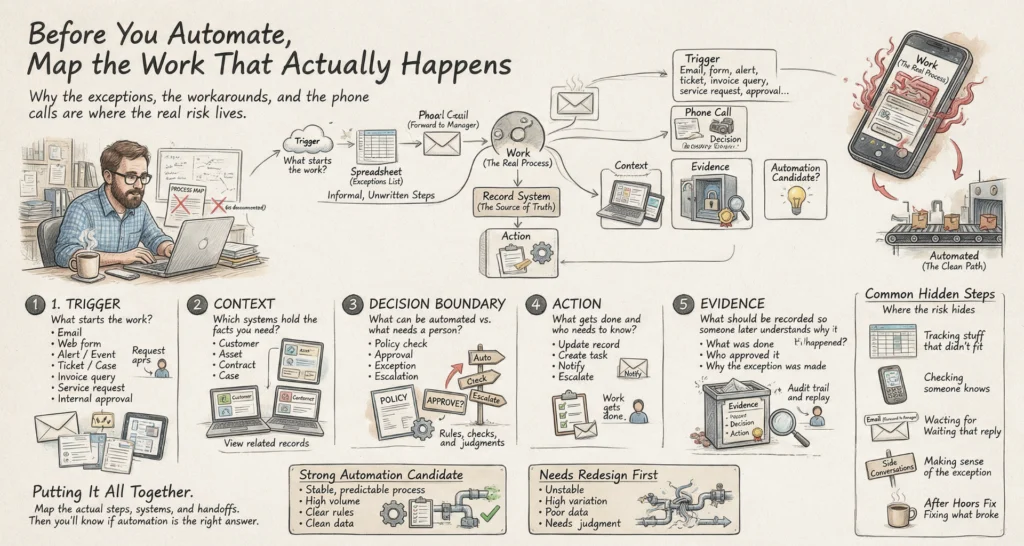
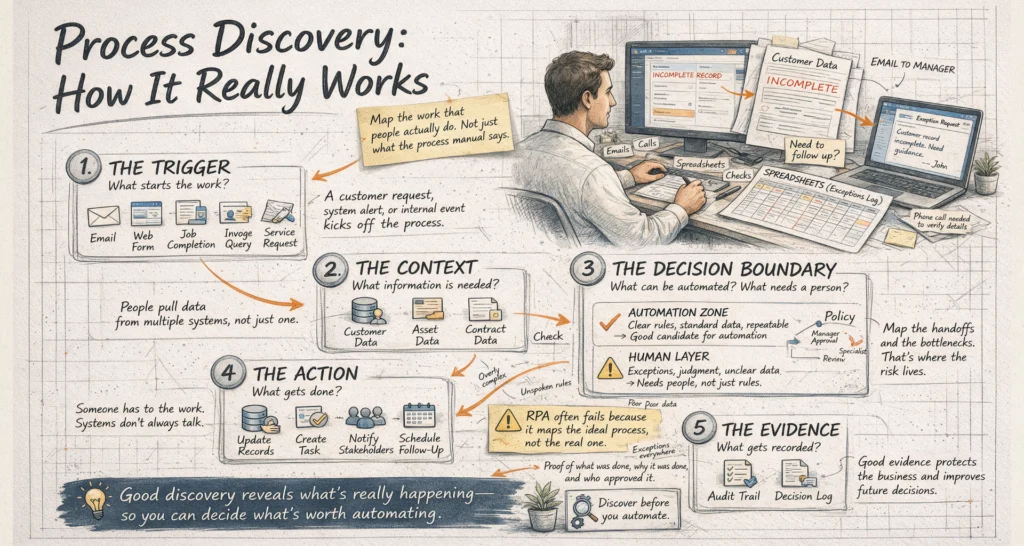
Start by mapping a workflow as it is actually performed. Include the informal steps that rarely appear in a process document: the spreadsheet used to track exceptions, the email forwarded to a manager, the phone call needed when a customer record is incomplete. These are often where the operational risk and delay sit.
A practical discovery process should establish five things:
- The trigger. What starts the work: an email, web form, job completion, invoice query, service request or internal approval?
- The context. Which systems hold the customer, asset, contract, financial or case information needed to act?
- The decision boundary. What can proceed automatically, what requires a policy check, and what must be approved by a named role?
- The action. Which records need updating, which tasks must be created, and who needs to be notified?
- The evidence. What should be recorded so a manager can understand why the system acted and who approved an exception?
This mapping exposes whether automation is appropriate. A stable, high-volume process with clear rules is usually a strong candidate. A process that changes daily, has poor source data or relies on unspoken expert judgement may need redesign before it is automated.
Build routes with approval at the right points
The value of AI in workflow automation is not limited to generating text. It can make unstructured inputs operational. An agent can read an incoming request, extract relevant fields, compare details against policy, retrieve approved information and prepare a proposed action. It can also flag low confidence, missing context or a possible exception rather than forcing a decision.
The key is to place controls at decision boundaries. For example, a healthcare administration workflow may receive a referral, check whether mandatory documentation is present, create a draft record and route incomplete items to an administrator. If a request involves a sensitive category, non-standard billing or an ambiguous instruction, it should stop for review. The person approving it should see the relevant source material, the policy result and the proposed action.
This approach is more reliable than asking an AI assistant to “handle referrals”. It gives the system a defined role and gives people clear authority. Approval is not a sign that automation has failed. It is how an organisation maintains control where the cost of a wrong action is higher than the cost of a short review.
Connect context across systems
Most operational delays are context delays. A staff member has to open several applications, find the right record, confirm the latest status and then manually update each system after acting. The work may be simple, but the route is fragmented.
Integration changes this. A workflow can bring together the job history from a field service platform, account details from a CRM, stock availability from an ERP and the original customer request from an inbox. Model Context Protocol, or MCP, can provide a controlled way for AI-enabled systems to access approved tools and information sources without treating every system as an open-ended data pool.
Access should be deliberate. The automation needs the minimum information and permissions required for its assigned action. A scheduling agent may read technician availability and create a tentative booking, but it should not have unrestricted access to payroll records. A finance workflow may prepare a payment exception for review, but payment release should remain limited to authorised approvers.
These constraints improve security and operations at the same time. When responsibilities are explicit, teams can test the route, investigate incidents and change individual components without losing sight of who can do what.
Measure capacity, not activity
Counting automated tasks can be misleading. A workflow that sends 10,000 notifications is not valuable if it creates confusion, duplicates work or shifts effort downstream. Better measures are tied to the operational outcome.
For a field service business, that may mean time from customer enquiry to confirmed booking, first-time completion rate, or the number of coordinator hours returned to exception handling. For healthcare administration, it may be reduced referral processing time, fewer incomplete records reaching clinicians and clearer audit evidence. For professional services, it may be faster matter opening, fewer missed approval steps and improved time capture.
Set a baseline before implementation. Measure the current cycle time, error rate, rework, queue size and staff effort for the workflow. Then monitor what changes after automation, including exceptions and escalation rates. A reduction in manual touchpoints is useful, but only if quality and accountability hold.
There is a trade-off. Highly tailored automation can fit a complex process closely, but it may cost more to maintain when policies or systems change. A simpler route may deliver most of the benefit sooner. The right choice depends on volume, risk, process stability and the cost of delay.
LET’S BUILD WHAT’S NEXT
Make your next move
an intelligent one.
Tell us where the bottlenecks are. Let’s explore what AI can do for your business.
Treat governance as part of the design
Governance is often added after a pilot proves useful. By then, a workflow may already have broad permissions, unclear ownership and no reliable record of its decisions. Retrofitting control is harder than designing it from the start.
Each automation should have an accountable business owner, a documented purpose, defined data access and an escalation path. Teams also need evidence: what triggered the route, which data informed the recommendation, which policy checks were applied, what action was taken and whether a person approved it.
This does not require turning every workflow into a compliance project. It means applying rigour proportionate to the consequence. A low-risk internal reminder needs modest controls. A workflow affecting customer commitments, patient administration, financial treatment or contractual obligations needs stronger checks and clearer human authority.
SpeedOz approaches AI-enabled operations as an accountable route rather than a standalone chatbot. That mindset is useful for any organisation: connect the systems you already rely on, automate the repeatable work, and keep decisions visible where they matter.
The strongest automation programmes do not ask people to trust an invisible system. They give teams a faster way to work, a clear point to intervene, and enough evidence to stand behind every consequential action.