
A capable AI assistant can draft an answer from a prompt. It becomes operationally useful when it can check a job record, retrieve the right document, create a task, update a CRM and route an exception to the right person. MCP servers are the controlled connection layer that makes those actions possible without turning an AI model into an ungoverned user of every system in the business.
For organisations dealing with fragmented software, the attraction is clear. Your people already work across inboxes, CRMs, ERPs, service desks, document repositories and specialist internal applications. The issue is rarely a lack of data. It is that context and action are separated by manual hand-offs, duplicate entry and decisions made without a complete view of the work.
Model Context Protocol, or MCP, gives AI applications a standard way to request approved context and use approved tools. The protocol matters less as a technical trend than as an operating design choice: define what an AI system may see, what it may do, when it must stop, and what evidence it must leave behind.
What MCP servers actually do
An MCP server exposes selected capabilities from a system to an AI application through a consistent interface. Those capabilities may include reading a customer record, searching a policy library, creating a service ticket, checking stock availability or submitting a draft for approval.
The server does not replace the CRM, ERP or document platform. It sits at the boundary between the AI application and that system. It translates a structured request into an approved action, returns the relevant result and can apply controls before anything changes.
In practical terms, an AI agent might receive a request from a field technician: “The customer needs to move Friday’s installation.” Through an MCP server, the agent could inspect the job record, check technician availability, identify contractual constraints and prepare alternative times. If the reschedule falls within defined rules, the workflow may proceed. If it affects a high-value contract, breaches a service commitment or requires a pricing change, the agent should route the matter to an authorised person.
That distinction is fundamental. An MCP server can provide access to a capability. It should not decide by itself that every available capability is appropriate in every circumstance.
Why MCP servers matter to operations leaders
Most businesses do not need another isolated chatbot. They need work to move across existing systems with less delay and clearer ownership.
MCP servers help reduce the custom integration work required for every new AI use case. Instead of building a one-off connection between each assistant and each business platform, a well-designed server can expose a reusable set of governed tools. A service operations agent, a sales support agent and an internal knowledge assistant may each use the same approved customer lookup capability, while receiving different permissions and different levels of detail.
This can improve capacity in places where teams lose time to repetitive coordination. Consider a professional services firm preparing a client matter. An AI workflow can gather the engagement details, find the latest templates, identify missing documents and create a task list for review. It can accelerate preparation without being given authority to issue advice, vary an agreement or send a consequential document without sign-off.
For healthcare administration, the pattern may be appointment coordination, referral document handling and follow-up task creation. For field service, it may be job triage, parts checks, technician scheduling and customer updates. The operational value comes from connected action, not from generating more text.
The route matters more than the connection
Connecting an AI system to business tools is not automatically safe because the connection uses MCP. Protocols standardise communication. They do not create governance on their own.
A useful implementation starts by mapping the route of work. Capture the request. Establish identity. retrieve the minimum relevant context. Check policy. determine whether the action can proceed automatically. Obtain approval where required. Execute the permitted action. Record what happened.
Each stage answers a practical question. Who made the request? Which records were accessed? Which rule allowed the action? Did a person approve it? What changed in the source system? Can the organisation reconstruct the decision if a customer, auditor or manager asks?
Without this route, an apparently helpful agent can create a new kind of operational blind spot. It may update records in the wrong system, act on stale information, follow instructions embedded in an untrusted document or expose information beyond the requester’s role.
Permissions need to be specific
A common mistake is to connect an AI assistant using a broad administrator account because it is quick to set up. That may get a demonstration working, but it creates unacceptable exposure in production.
Permissions should be scoped to the job. A scheduling assistant may need to read appointments and propose a change, but not access payroll records. A sales agent may create a follow-up task, but not alter account credit terms. A knowledge assistant may search approved internal material, but not retrieve every file in a shared drive.
The right level of access depends on the use case. Read-only retrieval may be appropriate for an early deployment. A mature workflow may allow limited write actions, such as creating a draft or assigning a task. Irreversible actions, financial commitments, sensitive communications and changes to customer obligations usually require stronger checks and human authority.
Ready to get started?
A one-line nudge that earns the click below.
Approval is a design feature, not a failure
Human approval is sometimes framed as friction. In consequential workflows, it is a control that preserves accountability while allowing the system to remove preparation work.
The best approval points are specific. Do not ask a manager to approve every low-risk action. Ask them to approve the exception: a discount below policy, a change to a clinical administration pathway, an overdue invoice escalation, or an alteration to a contractually committed service window.
An effective approval request includes the evidence needed to make the decision quickly. It should show the relevant facts, the proposed action, the rule or threshold involved, and the likely effect. The approver remains responsible for the decision, while the AI system handles the collection, comparison and routing.
A practical MCP server architecture
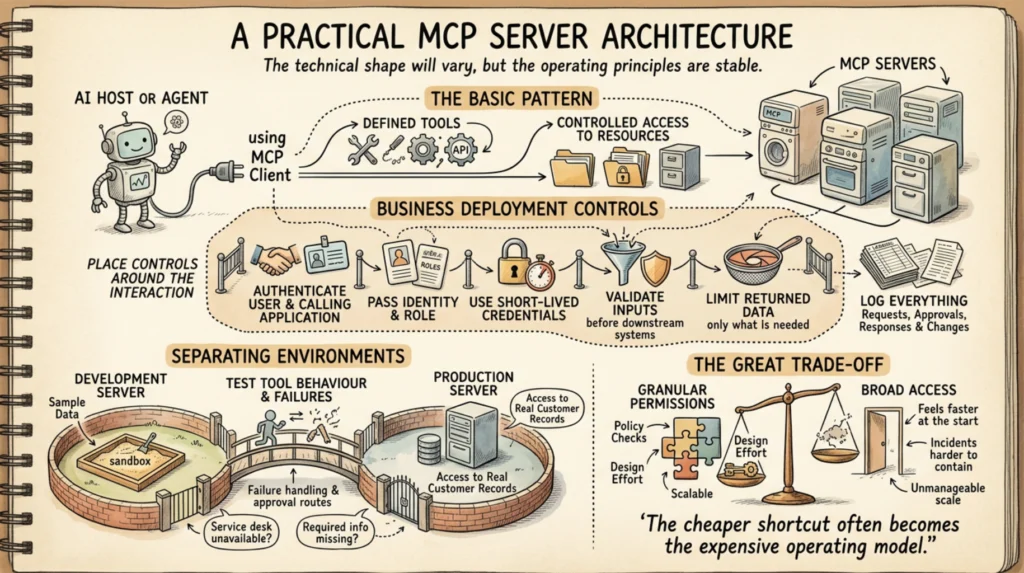
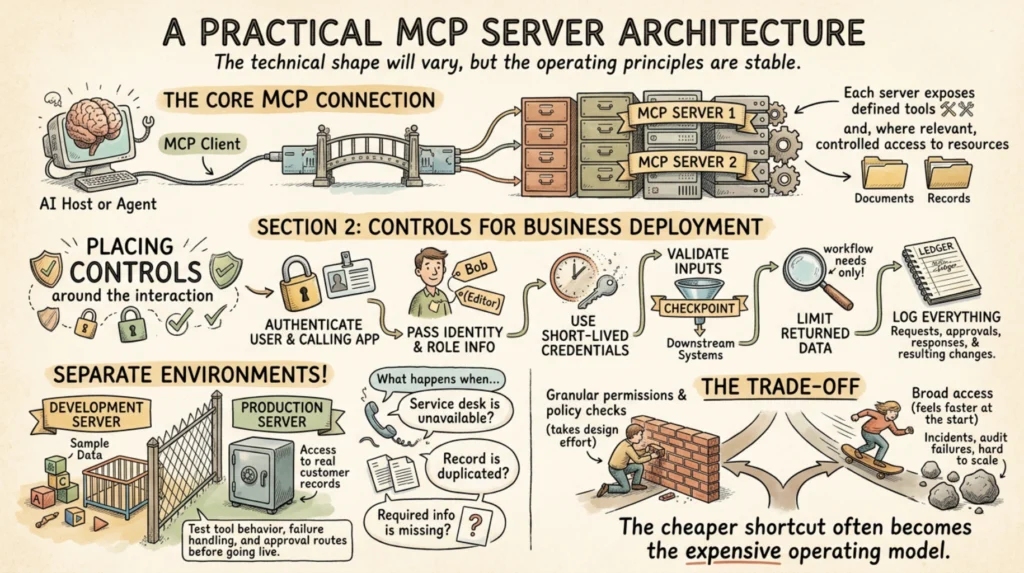
The technical shape will vary, but the operating principles are stable. An AI host or agent uses an MCP client to connect to one or more MCP servers. Each server exposes defined tools and, where relevant, controlled access to resources such as documents or records.
For a business deployment, place controls around that interaction. Authenticate both the user and the calling application. Pass identity and role information where the connected platform supports it. Use short-lived credentials where possible. Validate inputs before an action reaches a downstream system. Limit returned data to what the workflow needs. Log requests, approvals, responses and resulting changes.
It is also wise to separate environments. A development server with sample data is not a production server with access to real customer records. Test tool behaviour, failure handling and approval routes before allowing live actions. A tool that creates tickets should also explain what happens when the service desk is unavailable, when a record is duplicated or when required information is missing.
There is a trade-off here. Highly granular permissions and policy checks take design effort. Broad access feels faster at the start. But broad access makes incidents harder to contain, reviews harder to complete and scale harder to manage. The cheaper shortcut often becomes the expensive operating model.
Questions to answer before implementation
Before connecting MCP servers to core systems, leadership should be able to answer a small set of direct questions:
- Which workflow has enough volume, delay or error to justify automation?
- What information does the AI system genuinely need to complete that workflow?
- Which actions are safe to automate, and which require human approval?
- Which system remains the source of truth after an action is taken?
- What evidence must be retained for operational review, compliance or customer dispute resolution?
These questions prevent a technology-first rollout. They also surface process issues that exist whether AI is involved or not, such as unclear ownership, inconsistent policies or duplicated data.
Measuring value beyond the demo
A successful MCP implementation should produce measurable operational movement. That may be a shorter time to triage a service request, fewer manual touches per job, faster retrieval of client information, better follow-up compliance or more capacity released for higher-value work.
Measure the controls as well as the speed. Track approval rates, exception types, failed tool calls, rework, access denials and actions reversed by staff. These signals show whether the workflow boundaries are correctly designed. A high automation rate is not a success if it creates hidden correction work or weakens professional judgement.
SpeedOz approaches MCP server integration as part of an accountable operating route, not a standalone AI feature. The objective is to connect useful context to useful action while preserving identity, policy and human authority at the points where they matter.
The practical next step is not to connect every system at once. Choose one workflow where delays are visible, rules are understood and the outcome can be measured. Build the route carefully, let people retain consequential decisions, and use the evidence from real work to decide where the next connection belongs.