

An AI compliance tool review should begin where the software will meet real work, not with a feature checklist. If an AI system can read client records, draft advice, route a job, approve a payment or update a CRM, it is already part of your operating model. The question is not whether it has a compliance dashboard. The question is whether it can prove what happened at each decision boundary.
For Australian organisations, that distinction matters. Privacy obligations, industry rules, contractual commitments and internal delegations do not disappear because a task is automated. A useful tool must help teams apply those controls consistently while preserving enough evidence for a manager, auditor or customer to understand the outcome.
AI Compliance Tool Review: Start With the Operating Route
Most platforms present compliance as a layer around the model: user permissions, a policy library, audit logs and perhaps content filters. Those features have value. But they are incomplete if they sit apart from the workflow being governed.
Assess the route from request to recorded outcome. A sound route captures the request, identifies the user and relevant context, checks policy, obtains approval where required, performs the permitted action, and records the result. If a platform cannot support this sequence across the systems your teams already use, it may create another isolated control point rather than reduce operational risk.
Consider a field service business. An AI agent receives an email requesting an urgent repair. It may classify the issue, find the asset history, propose a technician and prepare a work order. That is useful capacity. But before it commits a booking, it should check customer entitlement, technician certification, service territory, parts availability and spending limits. A supervisor may still need to approve an out-of-hours call-out or an exception to a service agreement.
The compliance requirement is not merely that the agent produces polite, safe text. It is that the agent has authority for the specific action, works from appropriate data, respects the defined boundary and leaves inspectable evidence.
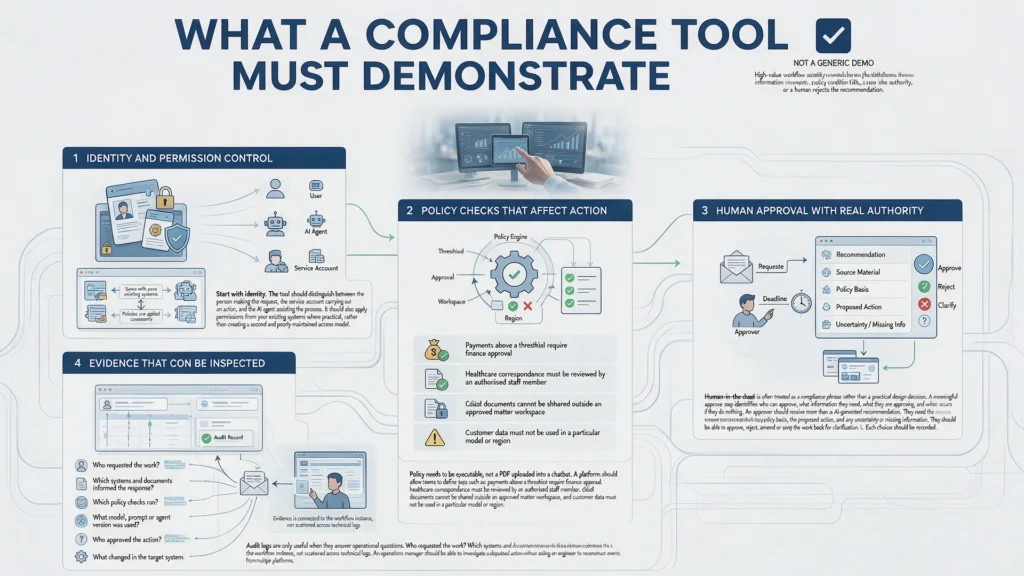
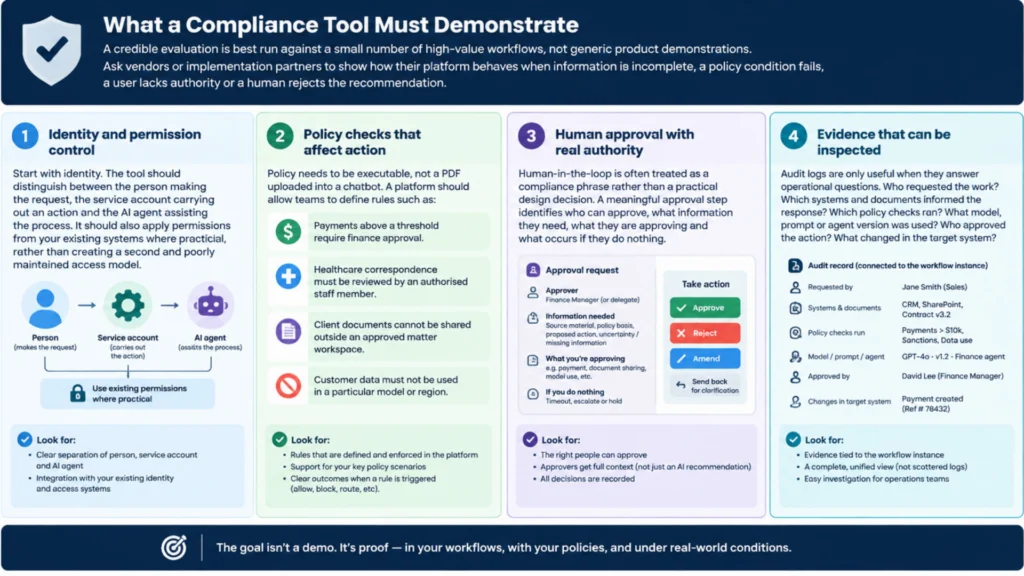
What a Compliance Tool Must Demonstrate
A credible evaluation is best run against a small number of high-value workflows, not generic product demonstrations. Ask vendors or implementation partners to show how their platform behaves when information is incomplete, a policy condition fails, a user lacks authority or a human rejects the recommendation.
Identity and permission control
Start with identity. The tool should distinguish between the person making the request, the service account carrying out an action and the AI agent assisting the process. It should also apply permissions from your existing systems where practical, rather than creating a second and poorly maintained access model.
This is especially relevant when connecting CRMs, document stores, ERPs, inboxes and service desks. An agent that can search across all of them may be helpful, but broad retrieval can expose commercial, clinical or employee information to the wrong user. Check whether access is enforced at retrieval time, action time, or both. The answer should be clear.
Policy checks that affect action
Policy needs to be executable, not a PDF uploaded into a chatbot. A platform should allow teams to define rules such as: payments above a threshold require finance approval; healthcare correspondence must be reviewed by an authorised staff member; client documents cannot be shared outside an approved matter workspace; and customer data must not be used in a particular model or region.
Ask where those checks run. A warning shown after an action is taken is not a control. The system must be able to pause, block or redirect the route before the consequential step occurs.
There is a trade-off here. Highly granular rules can increase confidence but can also slow implementation and create exception fatigue. Begin with boundaries around the actions that create the greatest financial, regulatory or reputational exposure. Expand controls as the workflow proves its value and edge cases become visible.
Human approval with real authority
Human-in-the-loop is often treated as a compliance phrase rather than a practical design decision. A meaningful approval step identifies who can approve, what information they need, what they are approving and what occurs if they do nothing.
An approver should receive more than an AI-generated recommendation. They need the relevant source material, the policy basis, the proposed action and any uncertainty or missing information. They should be able to approve, reject, amend or send the work back for clarification. Each choice should be recorded.
Not every task deserves a human checkpoint. Requiring approval for routine appointment reminders or low-risk document classification will simply move manual work around. Reserve human authority for consequential decisions, exceptions and cases where professional judgement is central.
Evidence that can be inspected
Audit logs are only useful when they answer operational questions. Who requested the work? Which systems and documents informed the response? Which policy checks ran? What model, prompt or agent version was used? Who approved the action? What changed in the target system?
Look for evidence that is connected to the workflow instance, not scattered across technical logs. An operations manager should be able to investigate a disputed action without asking an engineer to reconstruct events from multiple platforms.
This is also where retention and export capability matter. Your business may need to preserve evidence for contractual, clinical, financial or quality-assurance reasons. Confirm how long records are retained, whether they can be exported, and whether sensitive content can be redacted or access-controlled without destroying the audit trail.
LET’S BUILD WHAT’S NEXT
Make your next move
an intelligent one.
Tell us where the bottlenecks are. Let’s explore what AI can do for your business.
Test the Integration Boundary, Not Just the AI Model
A polished interface can conceal weak integration controls. For most businesses, the highest risk sits at the point where an AI recommendation becomes a change in a business system.
Review how the platform connects to applications. Does it use narrowly scoped service accounts? Can it separate read, write and delete permissions? Can an agent prepare a draft without being allowed to submit it? Are actions constrained through approved API operations or Model Context Protocol servers with defined tools and permissions?
A well-designed MCP integration can give an agent structured access to specific capabilities, such as creating a draft job, checking a customer record or retrieving an approved template. It should not become a broad pass into every database and application. The principle is simple: grant the minimum authority needed for the route.
Run failure tests as part of the review. Remove a required document. Introduce conflicting customer data. Ask the agent to exceed a delegated amount. Revoke a user’s permission midway through a task. The system should fail safely, explain the reason and direct work to an appropriate person or queue.
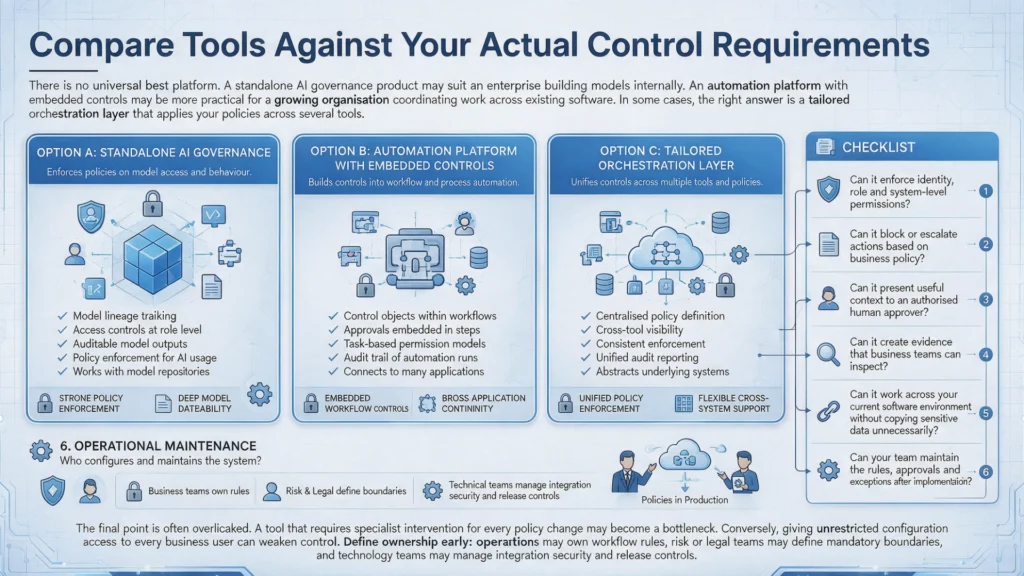
Compare Tools Against Your Actual Control Requirements
There is no universal best platform. A standalone AI governance product may suit an enterprise building models internally. An automation platform with embedded controls may be more practical for a growing organisation coordinating work across existing software. In some cases, the right answer is a tailored orchestration layer that applies your policies across several tools.
Use a consistent review lens across each option:
- Can it enforce identity, role and system-level permissions?
- Can it block or escalate actions based on business policy?
- Can it present useful context to an authorised human approver?
- Can it create evidence that business teams can inspect?
- Can it work across your current software environment without copying sensitive data unnecessarily?
- Can your team maintain the rules, approvals and exceptions after implementation?
The final point is often overlooked. A tool that requires specialist intervention for every policy change may become a bottleneck. Conversely, giving unrestricted configuration access to every business user can weaken control. Define ownership early: operations may own workflow rules, risk or legal teams may define mandatory boundaries, and technology teams may manage integration security and release controls.
The Practical Decision Standard
Do not buy an AI compliance tool because it promises governance. Select one because it can govern a named workflow under realistic conditions.
Choose two or three processes where delays, repeated handling or poor visibility have a measurable cost. Map the current route, identify decisions that need policy checks or approval, and test a proposed system against those conditions. Measure more than time saved. Track exception rates, approval turnaround, correction work, traceability and whether staff can explain the outcome to a customer or regulator.
Speed matters when work is routine. Control matters when decisions carry consequences. The strongest AI operating routes deliver both by automating the flow around human judgement, not pretending to replace it.