

A customer enquiry arrives in a shared inbox on Friday afternoon. Someone copies details into the CRM, another person checks a spreadsheet, and a manager is asked for approval in Teams. By Monday, no one can say who owns the next step. This is where the five signs processes need automation become commercially useful: they reveal where work is consuming capacity without producing better judgement or service.
Automation is not a case for removing people from important decisions. It is a way to route routine work through connected systems, apply the right policy checks, and present exceptions to the right person with the relevant context. The outcome should be faster operations with clearer ownership, not a black box that creates new risks.
Five signs processes need automation
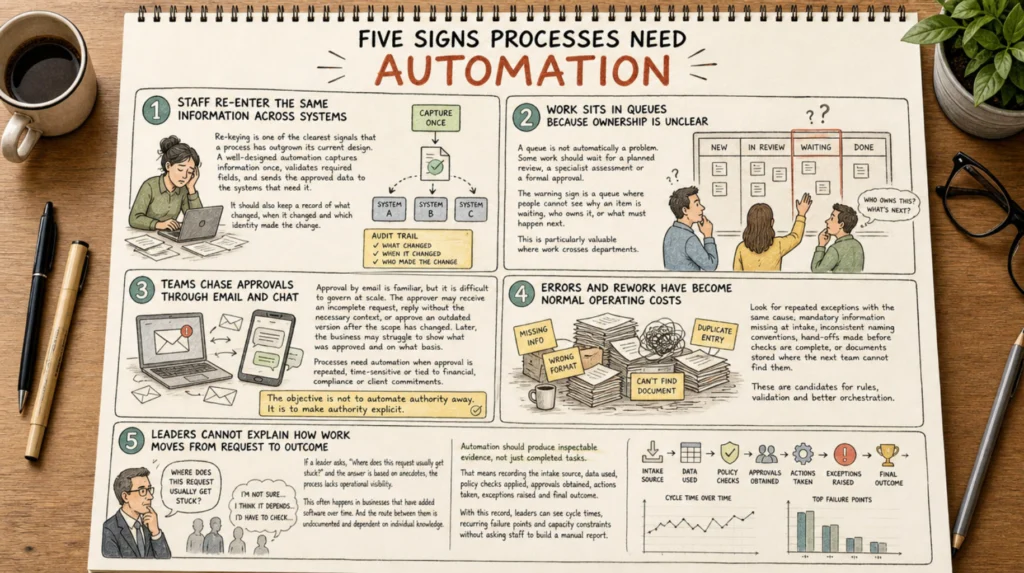
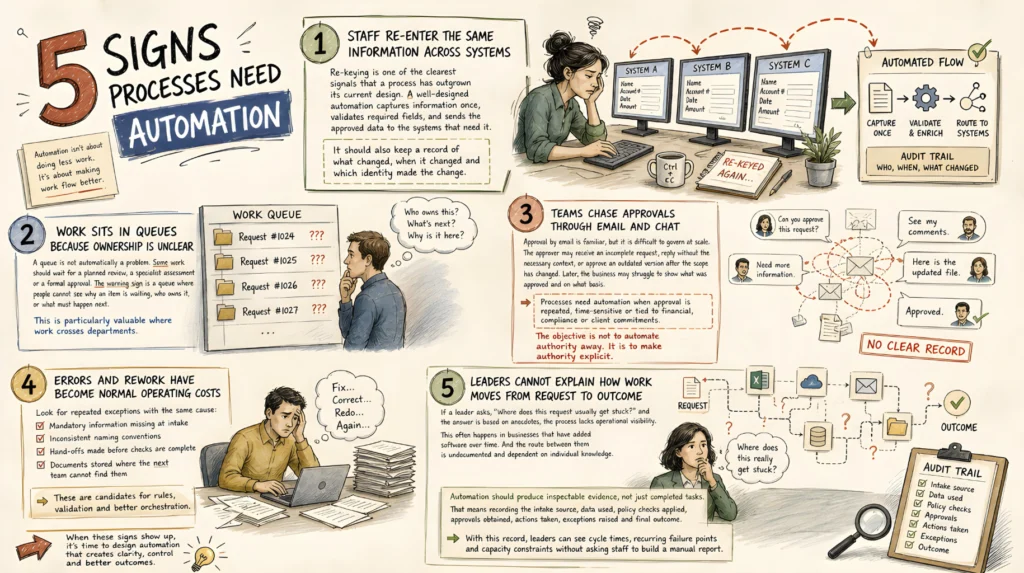
1. Staff re-enter the same information across systems
Re-keying is one of the clearest signals that a process has outgrown its current design. A job request may move from an email into a service platform, then into a CRM, accounting system, project board and client update. Each entry introduces delay and the chance of a mismatch.
The cost is larger than the minutes spent typing. When a customer address, asset number or scope changes in one system but not another, staff begin checking multiple sources before acting. Reporting becomes unreliable because each platform tells a slightly different story.
A well-designed automation captures information once, validates required fields, and sends the approved data to the systems that need it. It should also keep a record of what changed, when it changed and which identity made the change. For a field service business, that could mean creating a job, attaching site details and notifying the allocated technician from a single accepted request. For a professional services firm, it may mean opening a matter or engagement only after conflict and client checks are complete.
Not every integration needs to be immediate or two-way. The right pattern depends on which system is the source of truth and which updates carry risk. Start by defining that authority before connecting platforms.
2. Work sits in queues because ownership is unclear
A queue is not automatically a problem. Some work should wait for a planned review, a specialist assessment or a formal approval. The warning sign is a queue where people cannot see why an item is waiting, who owns it, or what must happen next.
Common examples include invoices awaiting coding, patient administration documents awaiting review, proposals waiting for technical input, and customer requests sitting between sales and delivery. Teams often manage this through follow-up messages, personal reminders and memory. That works until demand rises, a staff member is away, or a priority request is missed.
Automation can create an accountable route. It can classify the request, check urgency and service rules, assign an owner, set a due date and escalate only when an item breaches a defined boundary. The system does not need to decide every outcome. It needs to make the next accountable action visible.
This is particularly valuable where work crosses departments. A request can enter through a form, inbox, portal or AI concierge agent, then be enriched with CRM and service history before being routed to the appropriate team. The receiving person sees the request in context rather than spending the first ten minutes gathering it.
3. Teams chase approvals through email and chat
Approval by email is familiar, but it is difficult to govern at scale. The approver may receive an incomplete request, reply without the necessary context, or approve an outdated version after the scope has changed. Later, the business may struggle to show what was approved and on what basis.
Processes need automation when approval is repeated, time-sensitive or tied to financial, compliance or client commitments. The objective is not to automate authority away. It is to make authority explicit.
An approval route can confirm the requester’s identity, apply delegation rules, check thresholds, collect required evidence and send the decision to the right authorised person. If the amount, risk category or client status changes, the route can require a fresh review rather than carrying forward an old approval.
For example, an automated procurement route might allow low-value, budgeted purchases to proceed after policy checks, while sending higher-value or non-standard requests to a manager and finance. The evidence trail records the request, supporting documents, decision, timestamp and final action. People retain control over consequential decisions. The system removes the administrative chase.
4. Errors and rework have become normal operating costs
When staff regularly correct invoices, amend job details, chase missing documents or reconcile contradictory records, the process is signalling a design problem. Teams can become so accustomed to the workarounds that they no longer measure the capacity lost to them.
Look for repeated exceptions with the same cause: mandatory information missing at intake, inconsistent naming conventions, hand-offs made before checks are complete, or documents stored where the next team cannot find them. These are candidates for rules, validation and better orchestration.
Automation can prevent an incomplete request from moving forward, generate documents from verified data, compare records across systems, and flag exceptions for review. AI can add value where information arrives in unstructured forms, such as emails, PDFs or call notes. It can extract relevant details, propose a classification or prepare a draft response.
However, AI-generated outputs should not be treated as verified facts by default. For healthcare administration, legal or professional advice workflows, financial changes and customer commitments, define a human review boundary. The system can prepare, compare and route. An authorised person should confirm decisions where accuracy, duty of care or liability is material.
5. Leaders cannot explain how work moves from request to outcome
If a leader asks, “Where does this request usually get stuck?” and the answer is based on anecdotes, the process lacks operational visibility. This often happens in businesses that have added software over time. The tools may be capable, but the route between them is undocumented and dependent on individual knowledge.
A lack of visibility creates two problems. First, it makes improvement speculative. Second, it makes accountability difficult when a customer, auditor or executive asks what happened to a specific request.
Automation should produce inspectable evidence, not just completed tasks. That means recording the intake source, data used, policy checks applied, approvals obtained, actions taken, exceptions raised and final outcome. With this record, leaders can see cycle times, recurring failure points and capacity constraints without asking staff to build a manual report.
Modern orchestration can connect CRMs, ERPs, inboxes, service desks, document repositories and internal applications through governed workflows. In more complex environments, intelligent agents can retrieve approved context and coordinate bounded actions across those systems. The practical test remains simple: can the business explain what the system did, why it did it and who was accountable at each decision boundary?
Ready to get started?
A one-line nudge that earns the click below.
What to automate first
The best first candidate is rarely the process with the most fashionable AI use case. Choose a workflow with meaningful volume, repeated steps, measurable delay and a clear owner. It should have enough consistency to define a route, but enough pain that improvement matters.
Start by mapping the current flow from trigger to outcome. Identify the systems involved, the data created or changed, the hand-offs, the approvals and the exceptions. Then separate activities into three groups: work that can be performed automatically, work that can be prepared by AI or rules, and work that requires human judgement.
This distinction prevents two common mistakes. The first is automating a broken process faster. The second is forcing staff to override an inflexible workflow every time a legitimate exception appears. A useful operating route handles standard work efficiently and gives people a deliberate path for non-standard cases.
Set measures before implementation. Depending on the process, that may include response time, first-time accuracy, approval turnaround, backlog age, cost per transaction, revenue recovered or hours returned to the team. Review the evidence after release and adjust the route as policies, volumes and customer needs change.
For organisations with fragmented systems, this work is often less about replacing technology and more about connecting the investments already in place. SpeedOz approaches automation as an operating system for work: capture the request, connect relevant context, check policy, obtain approval where needed, coordinate action and record the outcome.
The useful question is not whether your business should automate everything. It is whether your people are spending their expertise on judgement, relationships and exceptions, or on copying, chasing and checking work that a controlled system could carry for them.