

A professional services firm rarely loses time in one dramatic failure. Capacity leaks through smaller gaps: a client request sitting in an inbox, a document chased twice, a matter opened with incomplete information, or a senior practitioner answering the same status question for the third time that day. These are operational problems, which is why AI automation for professional services must be designed as an accountable work route, not a clever chat interface.
The objective is not to remove professional judgement. It is to give that judgement better context, clearer decision boundaries and fewer administrative interruptions. Done properly, automation captures work, assembles the relevant evidence, checks the rules, routes approvals and records what happened. The firm remains in control.
Where professional services automation creates capacity
Law firms, accountants, consultants, financial advisers, engineers and other advisory businesses share a common challenge. Their value is delivered through skilled people, but much of their day is consumed by coordination around that work. Client onboarding, engagement letters, information requests, time capture, document preparation, progress updates, billing queries and internal reviews all cross multiple systems and people.
Conventional workflow automation can move a form submission into a CRM or create a task in a practice management platform. That remains useful. AI adds value when the work arrives in an unstructured form: an email, meeting note, scanned document, client portal message or voice transcript. It can classify the request, extract key details, identify what is missing, draft a response and prepare a case file for review.
The distinction matters. A generic automation simply moves information. An AI-enabled operating route can interpret information within defined limits, apply policy checks and ask a person to decide when the consequence warrants it.
Consider a new client enquiry. An orchestrated route may capture the enquiry from the website or inbox, identify the service line, check for required client details, search permitted systems for conflict or eligibility signals, create a draft record and send the appropriate engagement material. If the request is high risk, incomplete or outside policy, it stops for human review. The system does not pretend uncertainty is certainty.
Start with a workflow, not a model
Many firms begin with the question, “Which AI tool should we buy?” That tends to produce isolated experiments. A better starting question is: where does work slow down, repeat or disappear from view?
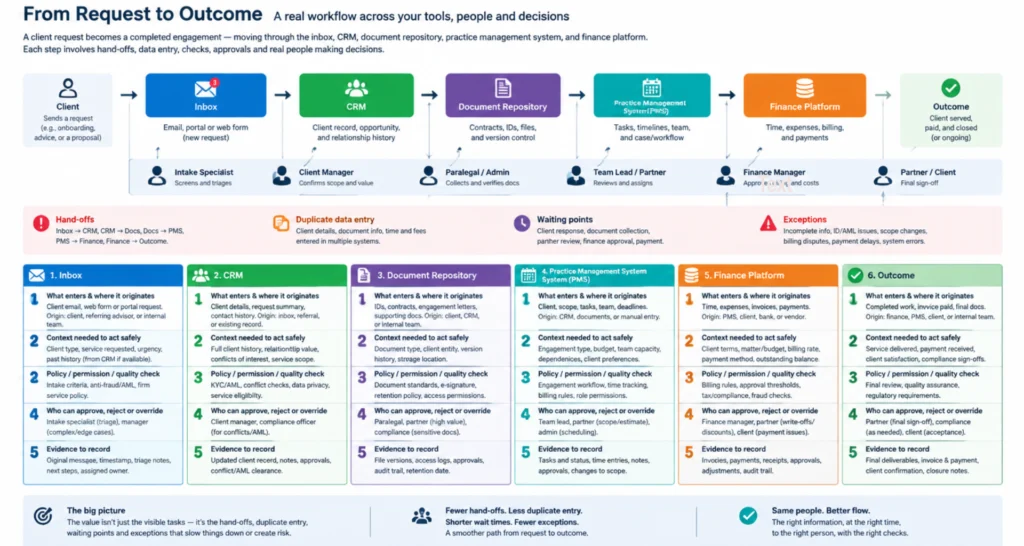
Map a real workflow from request to outcome. Include the inbox, CRM, document repository, practice management system, finance platform and the people who make decisions between them. The map should expose hand-offs, duplicate data entry, waiting points and exceptions. Those are usually more valuable than the most visible task.
For each stage, establish five practical points:
- What information enters the route, and where does it originate?
- What context is needed to act safely?
- What policy, permission or quality check applies?
- Who can approve, reject or override the action?
- What evidence must be recorded for later review?
This work can feel less exciting than prompting an AI assistant. It is also where implementation value is won or lost. Without clear inputs, ownership and decision rules, an automated process merely makes existing confusion happen faster.
Prioritise the right first use case
The strongest first use cases are frequent enough to matter, bounded enough to govern and measurable enough to improve. Client intake, document triage, meeting follow-up, compliance evidence collection and proposal preparation are often good candidates. They involve repeatable steps, but still benefit from human review.
A poor first use case is one with unclear ownership, inconsistent policy and no reliable source data. For example, asking an agent to produce final technical advice from scattered files may appear ambitious, but it creates a high-risk system before the firm has established permission controls or review routes.
Start with a contained workflow that returns time to a team. Measure the current effort, turnaround time, rework rate and exceptions. Then compare performance after deployment. Capacity is not an abstract benefit when a team can process more matters without adding administrative load.
SEE IT FIRST
Book a 20-minute walkthrough.
A real person, a shared screen, and zero pressure. Walk away with the answers you came for.
Build decision boundaries into the route
Professional services work is not just a sequence of tasks. It involves responsibility. A client may accept an automated acknowledgement, but they expect a qualified person to own advice, sign-off and material decisions.
That means every AI route needs defined boundaries. An agent may draft a client update, for example, but it should not send a sensitive conclusion without the approval level the firm has set. It may identify a missing tax document or contract clause, but a professional should determine the advice that follows. The right boundary depends on the service, risk profile, client agreement and applicable obligations.
A useful route follows a disciplined pattern: capture the request, connect relevant context, check policy, obtain approval where required, coordinate the next action and record the outcome. Each stage should be inspectable. If a partner asks why a draft was prepared, who approved it or which documents informed it, the answer should be available in the workflow record.
This is particularly important where personal, commercial or sensitive information is involved. Access should be based on identity and role. The system should retrieve only the material required for the task, not expose an entire client history because it is technically convenient. Logging, retention and escalation rules need to be designed before broad deployment, not added after a problem.
Connect systems without creating another silo
Most firms already own the systems they need. The issue is that those systems do not consistently work together. Client information sits in one platform, matter status in another, files in a document repository and staff conversations in email or a service desk. People become the integration layer.
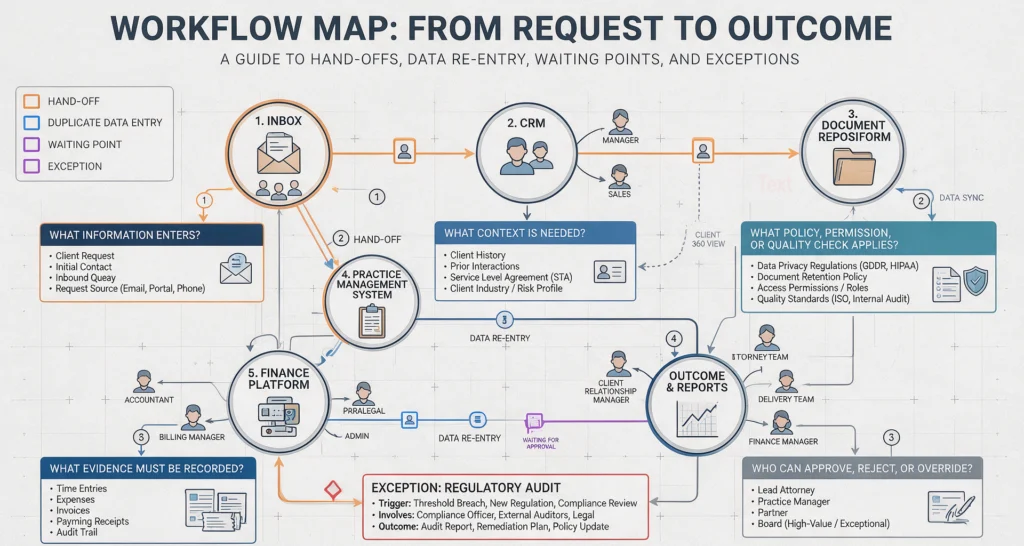
AI orchestration changes that by allowing a controlled agent or workflow to act across approved systems. Modern integration approaches, including Model Context Protocol (MCP) server connections, can give agents governed access to business tools and data. The important word is governed. Connections should expose specific actions and information, not unrestricted access to every system.
For a consulting firm, this could mean an agent receives a client request, checks the CRM for account details, retrieves the current statement of work, creates a project task, drafts a response and presents it to the engagement lead for approval. The client receives a timely answer, while the lead retains authority over the commitment.
For an accounting practice, the route might collect documents from a secure channel, identify missing items, update the client checklist and escalate exceptions to the assigned accountant. The system reduces chasing. It does not decide a tax position.
Design for exceptions, not just the happy path
Demonstrations usually show clean inputs and clear answers. Actual operations contain duplicates, missing attachments, conflicting client instructions, unusual terms and requests that arrive outside normal process. A dependable implementation is defined by what it does when those conditions appear.
Set confidence thresholds and escalation rules. If extracted data is incomplete, the route should request clarification or create a review task. If a policy check fails, it should stop rather than work around the failure. If an action affects a client commitment, payment, filing or professional recommendation, it should reach the correct authorised person.
This approach may appear slower than full autonomy. In practice, it is faster than fixing avoidable errors, restoring trust or explaining an untraceable decision. Automation should shorten routine work while making consequential work more deliberate.
Measure capacity, quality and control together
A firm can save minutes per task and still create a poor system if errors increase or staff no longer understand how work moves. Measure more than time saved. Track turnaround time, rework, queue age, completion rates, approval delays, exception volume and client response times. Also review the evidence trail: are decisions visible, and are the right people approving the right actions?
The measures will change as the route matures. Early on, exception rates reveal whether inputs and policies are sufficiently clear. Later, capacity and service levels show whether the process is producing commercial value. Regular reviews also identify where prompts, rules, integrations or approvals need adjustment.
SpeedOz approaches this as operational design, not a chatbot deployment. The useful question is not whether AI can perform a task. It is whether the firm can govern the route, inspect the evidence and confidently put the result into daily operations.
The best next step is to select one workflow your team repeatedly chases by email, map the decisions within it and ask where a machine can prepare, coordinate or check without taking ownership away from the professional responsible for the outcome.