

A missed job update is rarely just a missed update. It can mean a technician arrives without the right parts, a customer waits for an answer nobody owns, or an invoice sits unissued because proof of work is buried in a mobile photo. AI workflow automation for field service addresses these gaps by coordinating the work around the job, not merely automating isolated tasks.
For Australian field service businesses, the opportunity is practical. Dispatchers need a clear view of capacity. Technicians need the right information at the point of work. Customers need realistic communication. Finance teams need complete records before billing. AI can help move information, prepare decisions and identify exceptions, but it should not be given uncontrolled authority over commitments, safety or compliance.
The useful model is an accountable operating route: capture the request, connect the relevant context, check the applicable policy, obtain approval where needed, coordinate action and record evidence of the outcome.
Where field service workflows lose time
Most field service teams do not have a single system problem. They have a hand-off problem. A job may begin in a CRM, move into a scheduling platform, require asset history from an ERP, generate photos in a technician’s mobile app and end with an invoice in accounting software. Each tool may work well on its own. The operational cost appears between them.
Consider an urgent maintenance request. A coordinator receives an email with a vague description, checks the customer record, calls a technician, looks for parts availability, updates the customer and creates a work order. If the technician finds additional damage, the process repeats with a quote, customer approval, revised booking and updated parts requirement.
That sequence is not unusual. It is also where teams lose margin. Manual rekeying introduces errors. Calls and inboxes become the unofficial workflow engine. Experienced coordinators carry decision rules in their heads. Managers only see a problem after a job breaches its service level or a customer complains.
AI is most valuable when it reduces this coordination load while preserving the points at which a person must make a consequential decision.
What AI workflow automation for field service should do
A well-designed system does more than create work orders from emails. It interprets incoming information, retrieves context from connected systems and routes work according to defined rules. The output should be a prepared operational action with a clear owner, not a black-box decision.
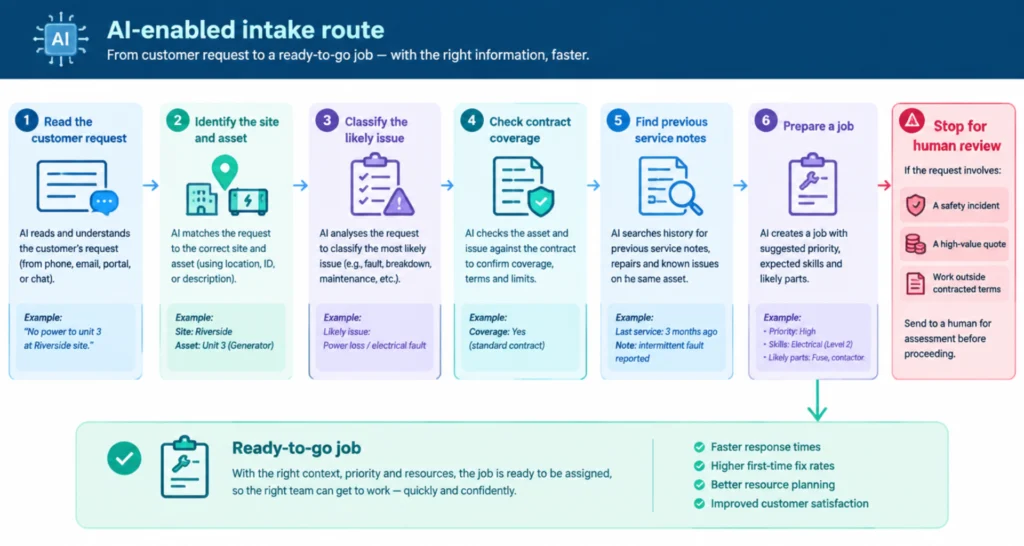
For example, an AI-enabled intake route can read a customer request, identify the site and asset, classify the likely issue, check contract coverage and find previous service notes. It can then prepare a job with suggested priority, expected skills and likely parts. If the request involves a safety incident, a high-value quote or work outside contracted terms, the route should stop for human review.
This distinction matters. Automatically assigning a routine inspection to an appropriately qualified technician may be sensible. Automatically approving a $20,000 repair based on an uncertain interpretation of photos is not. The system needs defined decision boundaries.
Capture and structure the request
Field requests arrive in inconsistent forms: emails, web forms, phone notes, portal submissions and messages from technicians already on site. AI can turn unstructured text, images and attachments into usable job data. It can identify a location, equipment reference, fault description and requested attendance window, then flag missing information.
The aim is not to pretend that every request is clear. It is to make uncertainty visible early. A coordinator should see that the asset serial number is missing or that the reported fault conflicts with the service history, rather than discovering it after dispatch.
Connect context before action
A good route gathers only the context needed for the next decision. That might include customer entitlement, site access instructions, technician certifications, parts stock, travel time, asset warranty and outstanding account holds.
This is where orchestration matters. AI should work across the systems a business already relies on, with controlled access to the right records. Model Context Protocol, or MCP, can provide a governed way for AI agents to retrieve approved information and initiate permitted actions across connected tools. The practical benefit is simple: staff do not need to hunt through five applications to prepare one job.
Check policy, then route exceptions
Policies should be operational, not trapped in a PDF. Define what a system can do automatically, what it can recommend and what requires approval. A same-day call-out for a contracted customer may be automatically routed within available capacity. An after-hours job with an estimated cost above a threshold may require manager approval before dispatch.
Exception handling is often more valuable than full automation. If a technician has the right licence but is already at risk of overtime, the system can surface alternate options. If parts are unavailable, it can prepare customer communication and place the job in a controlled waiting state. It should not make promises it cannot support.
A practical field service route
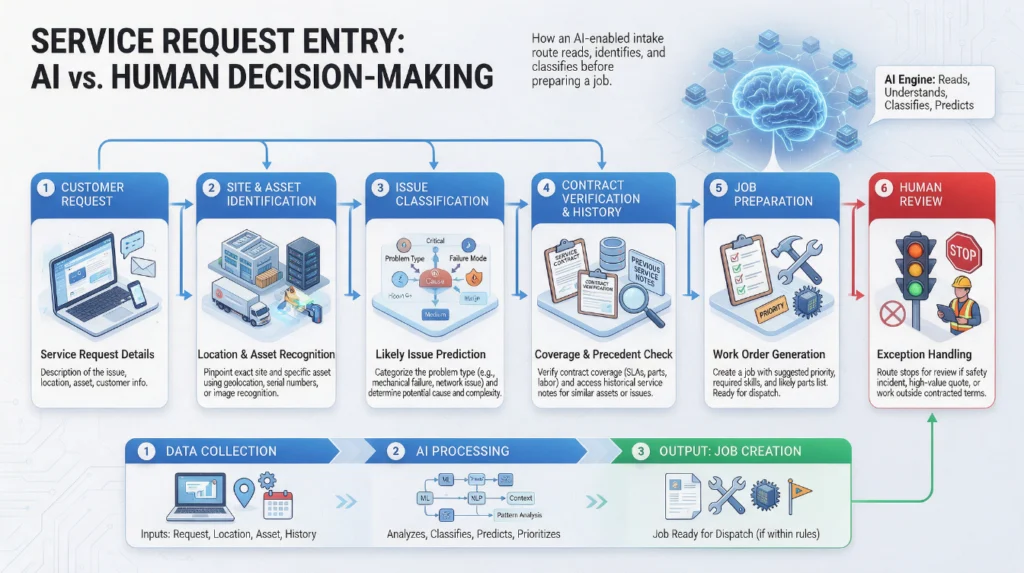
A mature workflow is easy to describe because each stage has a purpose. A customer reports a refrigeration fault at a regional site. The system captures the request, matches the site and equipment record, checks the service agreement and retrieves prior fault history.
It then assesses the request against a defined urgency framework. If the contract permits priority attendance and an appropriately qualified technician is within range, the system proposes an assignment and a customer arrival window. A dispatcher approves the job if the recommendation falls outside normal routing rules or would create a scheduling conflict.
Once approved, the technician receives a concise job brief on their mobile: issue summary, site instructions, safety requirements, service history, likely parts and the evidence required to close the work order. After the visit, photos, readings, customer sign-off and notes are checked for completeness. If the work is within scope, the job can progress towards invoicing. If additional repairs are identified, the route prepares a quote and waits for authorised approval.
Every action has an owner. Every transition leaves evidence. That is the difference between workflow automation and a collection of disconnected shortcuts.
SEE IT FIRST
Book a 20-minute walkthrough.
A real person, a shared screen, and zero pressure. Walk away with the answers you came for.
Start with work that has volume and rules
Not every field process is ready for AI. The strongest starting points are repetitive, high-volume workflows with clear inputs, recurring decisions and measurable delays. Job intake, triage, appointment communication, document checks, post-visit administration and invoice readiness are often suitable candidates.
A complex diagnostic process may still benefit from AI assistance, but it should not be the first deployment if the underlying data is unreliable or the operating rules are unclear. AI can organise information and suggest next steps. It cannot compensate for undefined responsibilities, inconsistent job codes or a scheduling process that changes according to who is on shift.
Before implementation, map the current route. Identify where work enters, which systems hold the source of truth, who approves which decisions and where evidence is currently lost. Measure baseline performance: time to acknowledge, time to dispatch, first-time fix rate, jobs awaiting information, quote turnaround and days from completion to invoice.
These measures establish whether automation is creating capacity or simply moving work around faster.
Governance keeps the route useful
Field service automation handles customer details, site access information, asset records and sometimes safety-critical decisions. Governance cannot be added after the workflow is live. Identity controls should determine which people and agents can view records or trigger actions. Approval rules should reflect financial, contractual and safety thresholds. Logs should show what information informed a recommendation, who approved it and what happened next.
There is a trade-off. Too many approval gates can recreate the delays automation was meant to remove. Too few can create costly commitments without proper oversight. The right design places human attention at the decision boundaries where judgement, authority or risk genuinely matter.
This also makes continuous improvement possible. When a route is inspectable, leaders can see whether recommendations are accepted, where exceptions accumulate and which policies need refinement. The system becomes easier to trust because its behaviour can be reviewed.
Build for technicians, not just the back office
The field experience determines whether the system delivers value. Technicians should receive fewer notifications, better briefs and clear next actions. They should not be asked to duplicate information already available elsewhere or navigate a complicated workflow while standing at a customer site.
Design the mobile interaction around the job: what must be known before arrival, what must be recorded during work and what evidence is needed to close the task. Give technicians a simple way to flag exceptions that do not fit the expected route. Their real-world feedback is essential for improving the workflow rules.
The best first move is usually not a broad AI rollout. Choose one operational route where delays are visible, policy is understood and the outcome can be measured. Build the controls with the workflow, involve the people who run it, and let evidence determine where the next improvement belongs.