
A tool that writes a tidy meeting summary is not necessarily improving operations. The best AI tools for operations do more demanding work: they receive a request, assemble the right context, apply a policy, route an exception to the right person, update connected systems, and leave evidence of what occurred.
That distinction matters for Australian businesses with an established CRM, ERP, inbox, service desk and document repository already in place. The challenge is rarely a lack of software. It is the manual effort between systems: chasing missing information, copying updates, checking eligibility, escalating approvals and trying to reconstruct a decision after the fact.
The right AI tool depends on the route it must support. A field service team needs fast triage and controlled scheduling changes. A healthcare administration team needs careful document handling, privacy controls and staff sign-off. A professional services firm may need matter context, review boundaries and a defensible record of advice-related work. One generic chatbot will not cover those requirements.
Choosing the best AI tools for operations
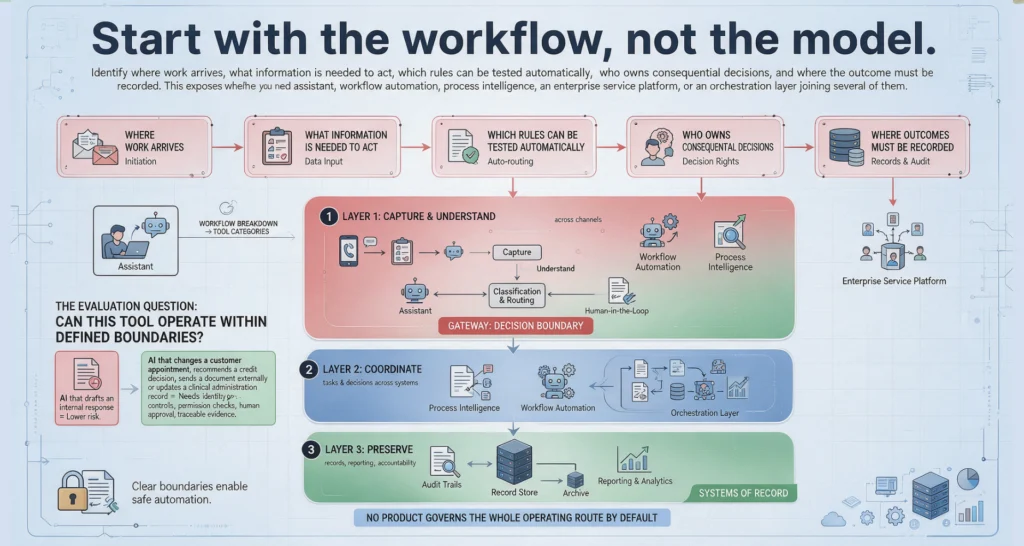
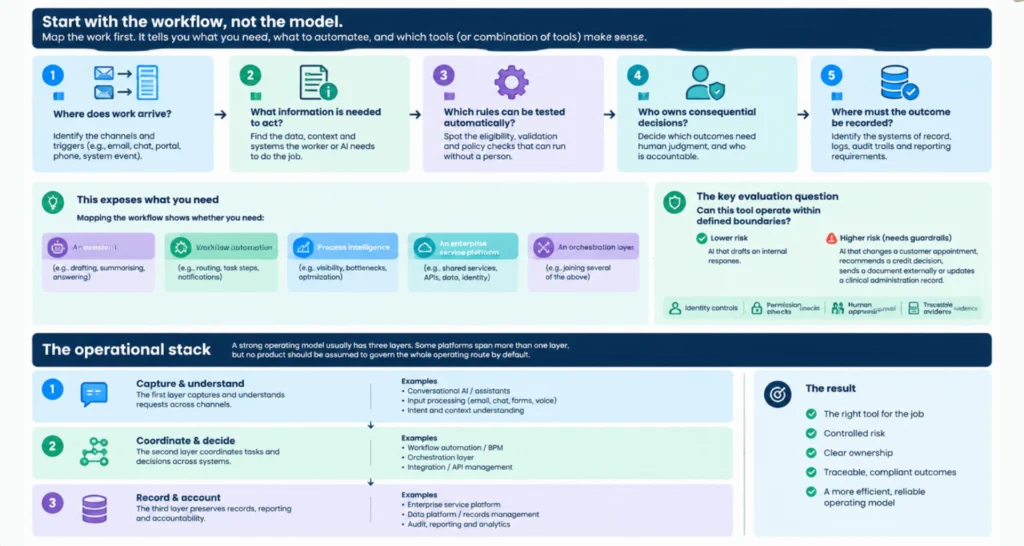
Start with the workflow, not the model. Identify where work arrives, what information is needed to act, which rules can be tested automatically, who owns consequential decisions, and where the outcome must be recorded. This exposes whether you need an assistant, workflow automation, process intelligence, an enterprise service platform, or an orchestration layer joining several of them.
The most useful evaluation question is simple: can this tool operate within defined boundaries? AI that drafts an internal response is a lower-risk use case. AI that changes a customer appointment, recommends a credit decision, sends a document externally or updates a clinical administration record needs identity controls, permission checks, human approval and traceable evidence.
A strong operational stack usually has three layers. The first captures and understands requests across channels. The second coordinates tasks and decisions across systems. The third preserves records, reporting and accountability. Some platforms span more than one layer, but no product should be assumed to govern the whole operating route by default.
The tools worth assessing by operating role
Microsoft Copilot, Copilot Studio and Power Platform
For organisations centred on Microsoft 365, Dynamics, Teams and SharePoint, Microsoft’s AI and automation environment is often a practical starting point. Copilot can assist staff with retrieval, drafting and summarisation, while Copilot Studio and Power Automate provide paths to build agents and workflows around existing Microsoft data and business applications.
Its advantage is proximity to the systems many teams already use every day. It can reduce the friction of moving from a conversation in Teams to a governed workflow, especially where identity is managed through Microsoft’s environment.
The trade-off is that a useful prototype can appear before the operational design is settled. Teams still need to define which data an agent may access, what it may change, when it must request approval and how exceptions are monitored. Microsoft capability is not a substitute for a decision policy.
ServiceNow for service operations
ServiceNow is well suited to organisations with significant service management, employee service, customer operations or case-based workflows. Its strength is not merely generative AI features. It is the combination of requests, assignments, knowledge, service records and workflow controls within a structured operating environment.
For an operations team, this can support a clear route: classify an incoming request, retrieve approved knowledge, create or update the relevant record, check conditions, assign work and escalate where judgement is required. It is particularly valuable when the business needs disciplined case handling rather than an isolated answer in a chat window.
It can be a substantial platform decision, however. If your operation is small or your workflows live mainly in another core system, implementing ServiceNow just to access AI features may be disproportionate. Assess it where service processes, controls and volume justify the platform footprint.
LET’S BUILD WHAT’S NEXT
Make your next move
an intelligent one.
Tell us where the bottlenecks are. Let’s explore what AI can do for your business.
UiPath for process automation at scale
UiPath remains a strong option where teams must automate repetitive, rules-led work across applications that do not integrate cleanly. This is common in finance operations, legacy administration environments and service teams working across portals, desktop software and structured documents.
Its value increases when AI is used to interpret unstructured inputs before automation executes defined steps. An agent might extract information from an emailed form, compare it with a policy, prepare a case and pass only valid items to an attended or unattended automation. The human can then approve exceptions rather than re-key every routine request.
The caution is maintenance. Screen-based automation can be sensitive to application changes, and unclear process ownership creates brittle automations. Use it where the route is stable enough to document, test and monitor. Do not automate a broken hand-off simply because the manual work is frustrating.
Salesforce, HubSpot and CRM-native AI
For revenue, customer success and account operations, CRM-native AI is often the most relevant place to begin. Salesforce and HubSpot can help teams summarise account activity, draft follow-up, prioritise records, identify missing fields and trigger structured workflows from customer interactions.
The operational opportunity is not just faster content creation. It is better follow-through. A customer enquiry can be captured, classified, matched to account context, routed to an owner and recorded against the customer history. That reduces missed revenue opportunities and gives managers a clearer view of workload and response performance.
Keep a boundary around customer-facing actions. Suggested messages, recommended next steps and internal task creation can be highly effective. Automated commitments, pricing changes or sensitive external responses should remain subject to defined permissions and approval rules.
Atlassian Intelligence and workflow tools
Teams operating through Jira, Confluence and Jira Service Management should consider Atlassian’s AI capabilities alongside its established workflow controls. This environment is particularly useful for technology operations, internal requests, project delivery and knowledge-heavy service processes.
AI can reduce the effort of triaging issues, finding relevant documentation and producing clearer updates. Jira workflows can then ensure the work has an owner, a status, a service-level target and an escalation path. The operational benefit comes from combining assistance with process discipline, not from generating more text about a ticket.
Zapier and Make for lighter integration routes
Zapier and Make can be effective for connecting cloud tools quickly, especially in growing businesses with straightforward triggers and a limited IT delivery backlog. They are useful for tasks such as creating CRM records from forms, sending internal notifications, moving approved data between SaaS tools and initiating simple follow-up sequences.
They are not automatically the right answer for high-consequence processes. As workflows accumulate, organisations can lose sight of credentials, error handling, data movement and who owns a route. For low-risk work, speed may be the priority. For regulated, sensitive or financially material work, introduce stronger design, logging and approval controls before expanding automation.
What separates an AI assistant from operational orchestration
An assistant answers or drafts. Operational orchestration coordinates action across systems under defined conditions. That difference should shape your buying decision.
A capable operating route may look like this: an email or form arrives; AI extracts the request and checks it against a customer record and policy source; a workflow identifies missing information; the right manager receives an approval request if a threshold is met; approved actions update the CRM and service system; the requester receives a controlled response; the complete decision trail is retained.
This design gives people authority where authority belongs. It also makes operational performance measurable. Rather than reporting that an AI tool was deployed, leaders can track time to triage, percentage of requests resolved without rework, exception rate, approval turnaround, data completeness and capacity returned to the team.
Modern orchestration can also use Model Context Protocol integrations and specialist agents to retrieve authorised context from different systems. The technical pattern is useful, but the governance question remains unchanged: what can this agent see, recommend, do and prove?
A practical selection test
Before committing to a platform, run one high-value workflow through a short assessment. Choose a process with enough volume to matter, clear pain points and an identifiable owner. Avoid a workflow that is politically contested or constantly changing until the underlying process is stabilised.
Assess the tool against five operational tests: connection to your current systems, control over permissions, ability to insert human approval, quality of logs and evidence, and the effort required to support it after launch. Feature lists matter less than these conditions. A technically impressive tool that cannot read the right context, record its actions or respect a decision boundary will create more supervision work than it removes.
SpeedOz approaches this as an operating design exercise. The useful question is not, “Which AI should we buy?” It is, “Which route should improve first, and what must remain under human control?” That leads to a system that fits the work rather than a demonstration that sits beside it.
The best next step is to map one real request from arrival to outcome. Follow every hand-off, decision, approval and system update. The right tools will become clearer once the route is visible.