
A credible AI implementation roadmap for business does not begin with selecting a chatbot or running a broad pilot. It begins where work is already slowing down: an inbox that drives too many manual hand-offs, a technician waiting on missing job history, a proposal process stuck in review, or a service team rekeying information across systems.
The goal is not to add AI to every task. The goal is to create a controlled operating route from request to outcome. That route should bring together the right context, apply policy, direct work to the right person or system, retain human authority where it matters, and leave evidence behind.
For Australian businesses managing growth across fragmented systems, this is the difference between a useful operational asset and another disconnected experiment.
Why AI projects stall after the pilot
Most pilots prove that a model can write, classify, summarise or answer questions. That is rarely the hard part. Production work introduces identity, permissions, incomplete records, conflicting data, exceptions, customer commitments and approvals. A system that produces a good draft is one thing. A system that can create a job, amend a customer record or prepare a compliance document is another.
The usual failure point is not model quality. It is the missing route around the model. Who can trigger the workflow? Which systems provide trusted context? What action is permitted? When must a person approve it? How can a manager inspect what happened later?
An implementation roadmap needs to answer those questions before it scales activity. This can feel slower than launching a standalone assistant, but it prevents costly rework and builds confidence with the teams expected to use it.
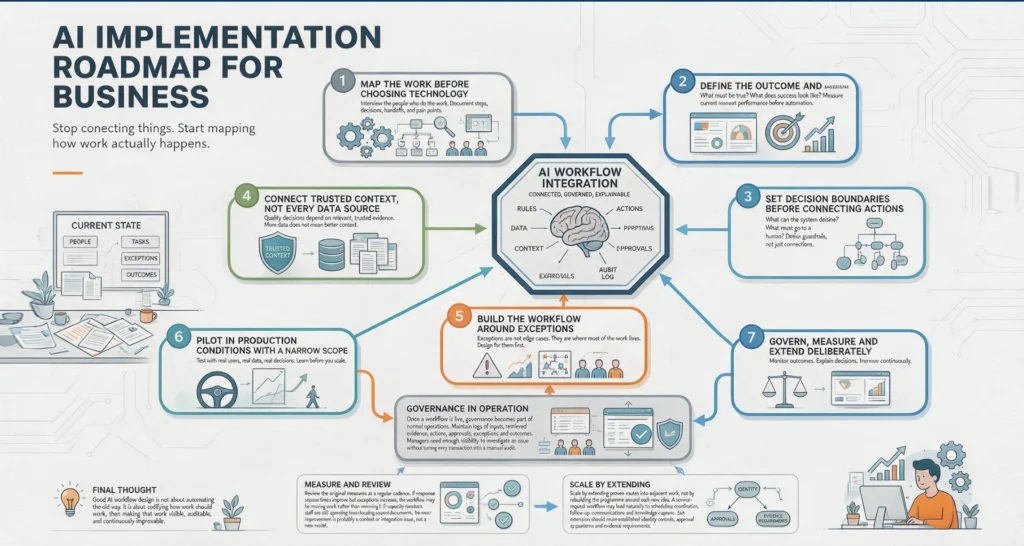
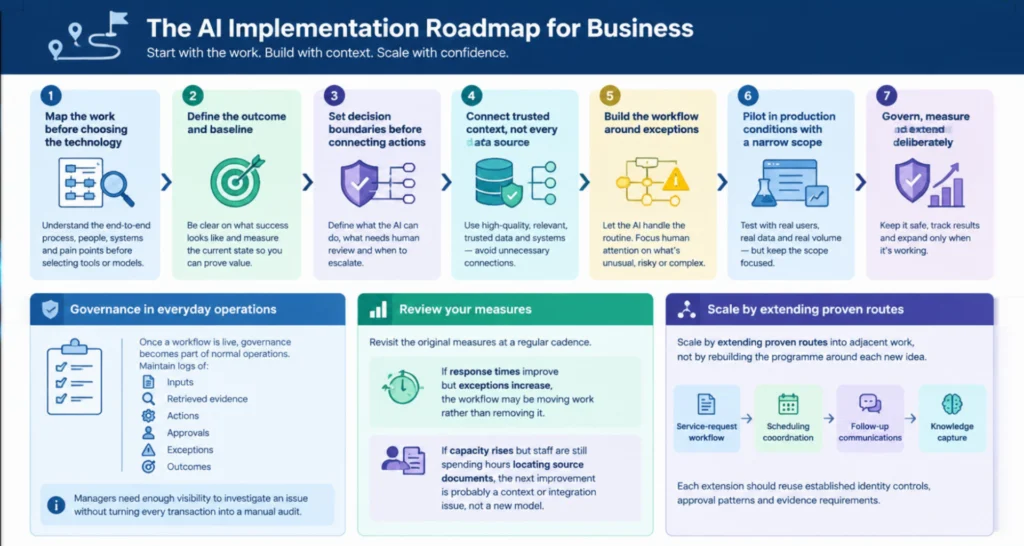
The AI implementation roadmap for business
1. Map the work before choosing the technology
Start with a workflow that has volume, friction and a measurable consequence. Good candidates typically involve repeated requests, multiple systems, predictable decisions and an identifiable owner. Examples include triaging service requests, preparing client onboarding packs, chasing missing documentation or producing first-draft scopes from site information.
Map the current route in practical terms: what starts the work, who touches it, where information is stored, what decisions are made and what happens when the normal path fails. Include unofficial workarounds. They often reveal the real operational design.
Avoid beginning with a generic question such as, “Where can we use AI?” A better question is, “Which workflow is consuming skilled capacity without improving judgement, service or revenue?” That gives the programme a business case from the start.
2. Define the outcome and baseline
A roadmap needs a measurable destination. For one business, that may be a shorter response time for qualified leads. For another, it may be fewer administrative hours per completed job, less rework in patient administration, or more matters processed per professional services team member.
Establish the baseline before changing the workflow. Measure cycle time, touchpoints, backlog, error rates, rework, escalation rates and the time senior staff spend on low-value coordination. Revenue outcomes can matter too, but they are often influenced by variables outside the workflow. Operational measures show earlier whether the system is working.
Be precise about what the AI-enabled route will and will not do. A target such as reducing first-response handling time by 40 per cent is useful. “Improve efficiency” is not. The first use case should create visible capacity or reduce a known risk, rather than merely generate activity.
3. Set decision boundaries before connecting actions
Not every decision should be automated. A useful design separates tasks into three categories: work the system can complete automatically, work it can prepare for approval, and work it can only assist with. The boundary depends on risk, regulation, financial exposure and the quality of available data.
LET’S BUILD WHAT’S NEXT
Make your next move
an intelligent one.
Tell us where the bottlenecks are. Let’s explore what AI can do for your business.
For example, an agent may classify an incoming request, retrieve the relevant account history and prepare a response. It might send routine status updates automatically within an approved template. A pricing exception, clinical-administration decision, contractual commitment or access change should route to an authorised person.
These boundaries need to be explicit in the workflow, not held informally by one experienced employee. Define approval roles, escalation conditions, spending limits, restricted data and the actions that require a second check. Human oversight is not a ceremonial click at the end. It is an operating control placed where professional judgement has consequences.
4. Connect trusted context, not every data source
AI is only as useful as the context it can reliably access. The practical task is to connect the systems that contain the minimum information needed to complete the route: perhaps the CRM, service desk, ERP, document repository, job management platform and shared inbox.
This is where orchestration matters. A well-designed integration can retrieve a customer record, verify identity and status, find the relevant procedure, check whether an action is allowed, then create a task in the correct system. Model Context Protocol integrations and other controlled connectors can make tools and data available to agents without turning the model into an unrestricted user of every platform.
More access is not automatically better. Limit access by role, workflow and action. Use source systems as the record of truth, retain existing permissions where possible, and identify what happens when data is missing or contradictory. A route that stops and asks for clarification is often safer than one that confidently fills the gap.
5. Build the workflow around exceptions
Happy-path demonstrations are easy. Operational systems earn their value when the information is incomplete, the customer is outside policy, a job has been reassigned, or a request arrives in an unexpected format.
Design for those cases from the beginning. The system should know when to pause, what evidence to present to a reviewer, who receives the exception and what action returns the work to the normal route. This is especially important in healthcare administration, field service and professional services, where a small missing detail can affect compliance, safety or a client commitment.
A multi-agent design can be useful when distinct responsibilities need to be separated. One agent may collect and structure information, another may check policy, and a third may coordinate approved actions. However, multiple agents are not a goal in themselves. If a single controlled workflow does the job clearly, it is usually easier to govern and maintain.
6. Pilot in production conditions with a narrow scope
The first live deployment should be narrow enough to inspect closely and meaningful enough to prove value. Choose a team, request type or region where the workflow has enough volume to learn quickly. Run the route with real permissions, real data and real escalation paths, while keeping the action scope controlled.
During this period, inspect more than output quality. Review whether the correct records were retrieved, whether policy checks fired as expected, how often staff overrode recommendations and where the workflow lost context. An apparently successful pilot that depends on constant manual correction is not ready to scale.
SpeedOz approaches this stage as an accountable operating route, rather than a chatbot deployment. Capture the request, connect context, check policy, obtain approval where needed, coordinate the action and record the outcome. Each stage has an owner and a reason for existing.
7. Govern, measure and extend deliberately
Once a workflow is live, governance becomes part of normal operations. Maintain logs of inputs, retrieved evidence, actions, approvals, exceptions and outcomes. Managers need enough visibility to investigate an issue without turning every transaction into a manual audit.
Review the original measures at a regular cadence. If response times improve but exceptions increase, the workflow may be moving work rather than removing it. If capacity rises but staff are still spending hours locating source documents, the next improvement is probably a context or integration issue, not a new model.
What a practical first 90 days can achieve
The first 30 days should focus on workflow discovery, baseline measurement and decision boundaries. The next 30 days can establish the required system connections, test data quality and build the controlled route. The final 30 days should place a narrow version into live use, inspect exceptions and refine the approval design.
This timetable is not fixed. A simple inbox-to-service-desk route may move faster. A workflow involving sensitive records, several legacy platforms or formal compliance controls may need more preparation. The discipline is the same: prove value in a bounded environment, then expand with evidence.
The best roadmap does not promise an autonomous business. It gives capable people better context, removes low-value coordination and keeps consequential decisions visible. Start with one route that matters, make its controls inspectable, and let measured operational gains determine the next move.