

A technician’s service report arrives by email at 4.47 pm. An invoice is attached, the job number is typed differently to the CRM, and a variation needs approval before it can be billed. This is where businesses look to automate document processing with AI. The opportunity is not simply faster data entry. It is a controlled route from document receipt to a verified action, with the right people involved when judgement is required.
For Australian organisations managing invoices, forms, referrals, contracts, reports or compliance records, document work is often where operational delays hide. Information is trapped in PDFs, scans, inboxes and shared drives. Teams retype it into systems they already own, chase missing fields, and make decisions without a complete record. AI can reduce that administrative load, but only when the workflow has clear boundaries.
Why document automation needs more than extraction
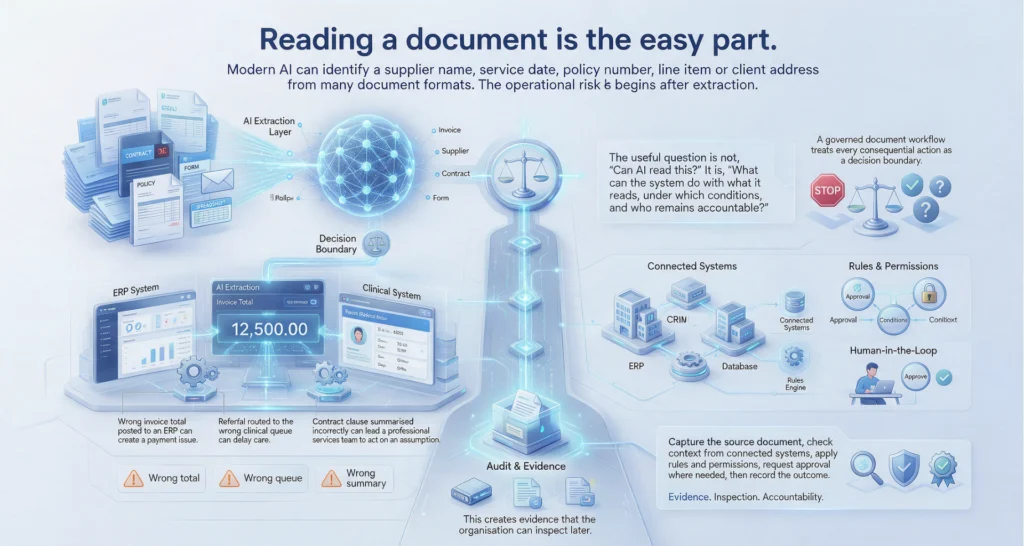
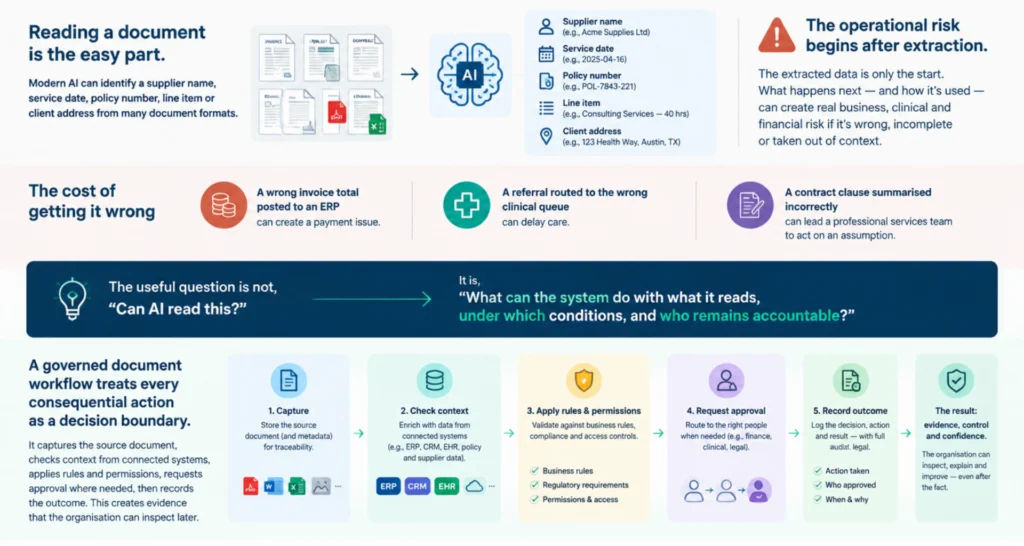
Reading a document is the easy part. Modern AI can identify a supplier name, service date, policy number, line item or client address from many document formats. The operational risk begins after extraction.
A wrong invoice total posted to an ERP can create a payment issue. A referral routed to the wrong clinical queue can delay care. A contract clause summarised incorrectly can lead a professional services team to act on an assumption. The useful question is not, “Can AI read this?” It is, “What can the system do with what it reads, under which conditions, and who remains accountable?”
A governed document workflow treats every consequential action as a decision boundary. It captures the source document, checks context from connected systems, applies rules and permissions, requests approval where needed, then records the outcome. This creates evidence that the organisation can inspect later.
How to automate document processing with AI
The strongest implementations begin with one defined document route, rather than an ambition to automate every file across the business. Choose a process with meaningful volume, repetitive handling and a visible delay or error cost. Accounts payable, field service job packs, client onboarding forms and healthcare administration are common starting points.
1. Map the work before selecting the model
Document automation should start with the current operating flow. Identify where documents arrive, who touches them, which systems hold relevant context, and what happens when information is incomplete or inconsistent.
For example, an invoice workflow may begin in an accounts inbox. The document is classified, key fields are extracted, the supplier is matched against the finance system, and the purchase order is checked. Low-value, high-confidence invoices that meet policy may be prepared for posting. Exceptions, duplicate risks and out-of-policy spend are sent to an authorised approver.
This mapping exposes the real constraints. Some documents may need to stay within a particular environment. Certain staff may be permitted to view client information but not approve payments. A missing purchase order may require a project manager’s response, not an AI-generated guess. These are not technical footnotes. They define the route.
LET’S BUILD WHAT’S NEXT
Make your next move
an intelligent one.
Tell us where the bottlenecks are. Let’s explore what AI can do for your business.
2. Capture documents and preserve the source
The workflow should accept documents from the channels people already use: inboxes, portals, mobile uploads, service desks, CRM records, document repositories or scanned forms. The original file should remain attached to the resulting work item so users can check the source at any stage.
At intake, the system can classify the document type and identify whether it is usable. It can detect a blurry scan, a missing page, an unexpected attachment or a form that does not match the requested template. Rather than pushing poor inputs downstream, it should return a clear request for correction or assign the item to a person.
This is a practical control. AI confidence scores are useful signals, but they are not proof. A high-confidence extraction can still be wrong if the underlying document is wrong, outdated or ambiguous.
3. Extract information into a defined schema
Extraction works best when the business defines the fields that matter. An invoice may need supplier, ABN, invoice number, dates, totals, GST, purchase order and line items. A field service report may need asset ID, technician notes, parts used, customer sign-off and recommended follow-up work.
AI can interpret layouts that traditional template-based tools struggle with. It can also turn narrative text into structured values, such as identifying the reported fault from a technician’s notes or the renewal date in a contract. But the schema must be explicit. Vague extraction creates vague downstream action.
Field-level validation is equally important. Check that dates are plausible, totals reconcile, ABNs use the expected format, asset IDs exist, and mandatory fields are present. Where values do not reconcile, retain the extracted result but mark the item as an exception. Do not silently force a match.
4. Connect operational context before acting
A document rarely contains the whole picture. The invoice may need a purchase order from the ERP. A referral may need patient details from an approved clinical system. A contract request may need a client’s account status from the CRM and prior correspondence from the document repository.
This is where orchestration matters. Connected systems provide context, while controlled access ensures the workflow only retrieves information it is authorised to use. MCP server integrations can provide a structured way for AI agents to interact with enterprise tools, but the technology is not the point. The point is that the agent works within defined permissions, rather than operating as an unrestricted assistant.
The workflow should also distinguish retrieval from authority. It may look up a customer’s payment history, for example, without gaining permission to change credit terms. Clear separation reduces risk and makes responsibility easier to trace.
5. Apply policy checks and route exceptions
Policy checks turn extraction into operational control. The system can compare invoice values to approval thresholds, identify an expired insurance certificate, verify that a job variation has customer authorisation, or check whether a contract uses approved wording.
Some outcomes can be automated when the rules are stable and the impact is low. Others should always require a person. The boundary depends on the organisation’s risk appetite, regulatory obligations and the quality of available data.
A useful route has at least three outcomes: proceed, request more information, or send for review. The reviewer should receive the relevant document, extracted fields, supporting context, the policy reason for the exception, and a clear action to take. Asking staff to hunt across five systems defeats the purpose of automation.
6. Keep human approval close to consequential decisions
Human approval is not a sign that an automation failed. It is how accountable organisations retain ownership of decisions that affect money, clients, safety, compliance or professional judgement.
The goal is to make the approval small and informed. Instead of forwarding an invoice with the message “please check”, present the variance, matched purchase order, prior supplier history and recommended next step. Instead of asking a healthcare administrator to reread a whole referral, highlight missing information and route it to the correct authorised queue.
Approval actions should be recorded with the decision, timestamp, relevant policy and source evidence. That record supports audits, dispute resolution and process improvement. It also shows where policy may be unclear or where recurring exceptions need a different operating approach.
Measure capacity, quality and control
The first measure is often time saved, but document automation should be assessed more broadly. Track handling time, rework, exception rates, approval turnaround, duplicate prevention, processing backlog and the percentage of documents completed without manual rekeying.
Quality measures matter just as much. If automation increases speed while creating more corrections, it has shifted work rather than removed it. Review where confidence is low, where users override recommendations, and which document sources create the most exceptions. Those findings can improve document standards, supplier instructions and workflow rules.
For growing organisations, the value is frequently capacity. A finance team may close the month without adding another administrative role. A field service team may invoice completed work sooner. A professional services practice may give consultants more time for client work instead of document triage. These are operational outcomes, not AI theatre.
Common implementation mistakes
The most common mistake is automating an unclear process. If teams disagree about who approves an exception or which system is the source of truth, AI will expose the problem quickly. Resolve the operating rules first.
Another mistake is giving an AI agent broad access because it is convenient during a pilot. Start with the minimum permissions required for the route, then expand only where there is a clear business case. Finally, avoid treating a pilot as a production system. A useful demonstration still needs identity controls, logging, exception handling, monitoring and an owner responsible for its performance.
SpeedOz approaches these workflows as accountable operating routes: capture the document, connect the required context, check policy, obtain approval where required, coordinate the action and retain evidence. The implementation should fit the systems the business already relies on, not force staff into another disconnected tool.
Start with the document route that creates the most friction this month. Make its decisions visible, give people authority where it matters, and build from proven control rather than promise.