At 8:15 am, a service desk request can look simple: reset access, update a customer record, approve a purchase, book a technician. In practice, the request often crosses an inbox, service desk, CRM, ERP, document repository and several people before work is complete. AI service desk workflow automation is valuable when it shortens that route without removing the checks that protect customers, staff and the business.
The goal is not to put a chatbot in front of every ticket. It is to create an accountable operating route: capture the request, understand its context, apply policy, seek approval where needed, coordinate the right systems and people, then record what happened. Faster service matters. So does being able to explain why a decision was made.
Where AI service desk workflow automation earns its place
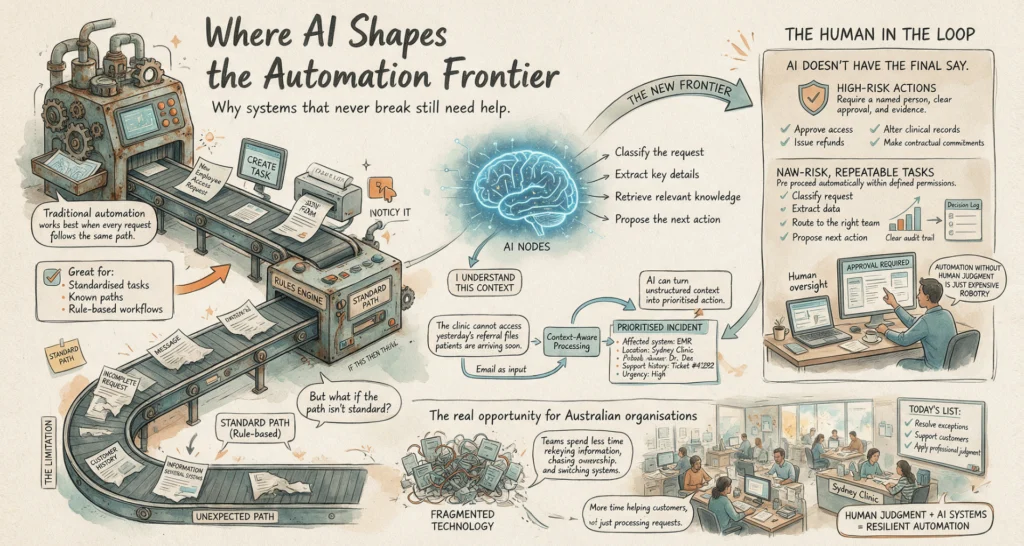
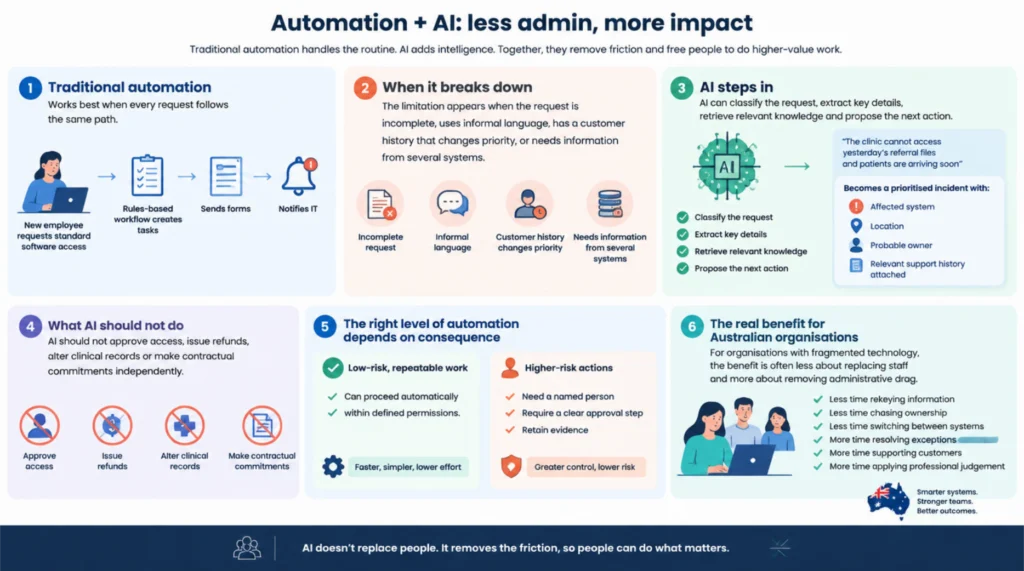
Traditional automation works best when every request follows the same path. If a new employee needs standard software access, a rules-based workflow can create tasks, send forms and notify IT. The limitation appears when the request arrives incomplete, uses informal language, has a customer history that changes priority, or needs information from several systems.
AI can classify the request, extract key details, retrieve relevant knowledge and propose the next action. It can turn an email saying, “The clinic cannot access yesterday’s referral files and patients are arriving soon”, into a prioritised incident with the affected system, location, probable owner and relevant support history attached.
That does not mean AI should approve access, issue refunds, alter clinical records or make contractual commitments independently. The right level of automation depends on consequence. Low-risk, repeatable work can proceed automatically within defined permissions. Higher-risk actions need a named person, a clear approval step and retained evidence.
For Australian organisations with fragmented technology, the benefit is often less about replacing staff and more about removing administrative drag. Teams spend less time rekeying information, chasing ownership and switching between systems. They can spend more time resolving exceptions, supporting customers and applying professional judgement.
Build the route before selecting the model
A useful service desk workflow starts with operational mapping, not a demonstration of an AI tool. Map the request from first contact to verified outcome. Include the systems involved, the people accountable at each handoff, the policies that apply and the evidence that must be retained.
This work commonly exposes the actual bottleneck. It may not be ticket categorisation at all. A field service team may lose time because job history sits in one system, asset documents in another and approval authority in email. A professional services firm may have the information to answer a client request but no reliable route for checking scope, conflicts or billing status.
Define the decision boundaries
Every workflow should distinguish between actions AI may perform, actions it may recommend and actions it must never take without approval. These boundaries are more useful than broad claims about autonomy.
For example, an AI agent may be permitted to:
- identify duplicate tickets and merge them under defined rules
- draft a response using approved knowledge articles
- create a task for the correct team based on service category and location
- request missing information from the requester
- update a ticket after a technician confirms completion
It may be allowed to recommend that a priority be changed, but a service manager should approve the change when it affects a customer commitment. It may prepare an access request, but identity and role checks should occur before provisioning. This is how automation increases capacity without creating an unaccountable shortcut.
LET’S BUILD WHAT’S NEXT
Make your next move
an intelligent one.
Tell us where the bottlenecks are. Let’s explore what AI can do for your business.
Connect context, not just applications
An integration that merely passes ticket text from one platform to another creates movement, not intelligence. The workflow needs enough approved context to make the next step credible: customer tier, asset history, current contract, incident status, staff role, knowledge article version or prior approvals.
Model Context Protocol, or MCP, can help establish controlled connections between AI agents and business tools. The point is not technical novelty. It is to give an agent access to the right tool and data source for a specific task, while limiting what it can read or change. Permissions should follow the role of the workflow, not the broadest permissions available to an administrator.
A practical operating pattern
The strongest implementations use a repeatable sequence, adjusted for the department and risk level.
1. Capture and normalise the request
Requests arrive through portals, email, mobile forms, chat and phone call notes. AI can recognise intent, pull out dates, identifiers and urgency signals, and ask targeted follow-up questions. The service desk receives structured work rather than a vague message that requires another round of clarification.
The system should preserve the original request alongside the extracted information. If a classification is wrong, the team needs to see both the source and the reasoning route, not only the final label.
2. Check identity, policy and context
Before an action is taken, the workflow verifies who is making the request and what rules apply. A staff member asking for a licence renewal may be legitimate, but the request might exceed their delegated authority or sit outside an active project.
This stage can query approved systems for current records, then apply clear conditions. If data is missing, inconsistent or outside policy, the route should stop or move to human review. A useful automation knows when not to proceed.
3. Coordinate work across systems and teams
Once the route is valid, the workflow can create tasks, update records, notify owners and prepare documents. Multi-agent systems can be useful here when distinct roles are required: one agent gathers information, another checks policy, and another prepares a response or task plan. Orchestration keeps those roles ordered and ensures each agent operates within its permitted scope.
For a field service business, this might mean matching an incident to an asset, checking warranty status, proposing a technician based on territory and skills, and sending the customer a confirmed appointment only after scheduling rules are satisfied. For healthcare administration, it may mean validating referral details, flagging missing consent documentation and directing exceptions to the appropriate administrator.
4. Obtain approval at consequential points
Human approval is not a sign that an automation has failed. It is a control that preserves ownership where judgement matters. The approval request should be concise and evidence-led: what was requested, which policy applies, what the system found, what action is proposed and what the likely impact will be.
Poorly designed workflows simply move the burden to a manager’s inbox. Well-designed workflows give the approver enough context to decide quickly, with an option to reject, amend or escalate.
5. Record the outcome and learn from exceptions
Each completed route should leave an inspectable record: source request, data consulted, policy checks, approvals, actions taken, timestamps and final status. This matters for auditability, customer disputes and operational improvement.
Exceptions are equally valuable. If the same type of request repeatedly reaches human review, the issue may be an unclear policy, weak source data or a process that has never been properly defined. Do not train the system to hide those problems. Use them to improve the route.
Measure capacity without losing sight of quality
Ticket volume and average handling time are useful, but they are not sufficient. A workflow that closes tickets quickly while creating rework has not improved service. Track first-contact resolution, time spent waiting for approvals, rate of incorrect routing, reopened tickets, exception volume and customer impact.
Also measure where human effort has moved. If AI reduces triage time but creates a stream of low-quality approval requests, the design needs work. If it gives technicians complete job context before they arrive onsite, the gain may show up in fewer repeat visits rather than in the service desk dashboard.
Start with a workflow that is frequent, painful and bounded. It should have enough volume to prove value, clear ownership and a manageable set of systems. Avoid beginning with the most politically sensitive process or the one with the poorest underlying data. Early success comes from disciplined scope, then iterative expansion.
AI service desk workflow automation works best when it is treated as operational infrastructure, not a conversational feature. Give it connected systems, clear boundaries and evidence at each decision point. The result is not just a faster queue. It is a service operation that can act with more speed, visibility and confidence.