

A sales team promises a delivery date. Finance needs a credit check. Operations needs stock, labour capacity and the correct site details. If those facts live in separate systems, the team is left chasing updates through inboxes, spreadsheets and phone calls. To connect CRM and ERP systems properly is to turn that fragmented hand-off into an accountable operational route.
The aim is not to make every field in two platforms identical. It is to ensure the right people and systems can act on reliable context, within defined permissions, with a record of what happened. That distinction is where many integration projects either create useful capacity or create a faster way to spread bad data.
Why CRM and ERP connections matter
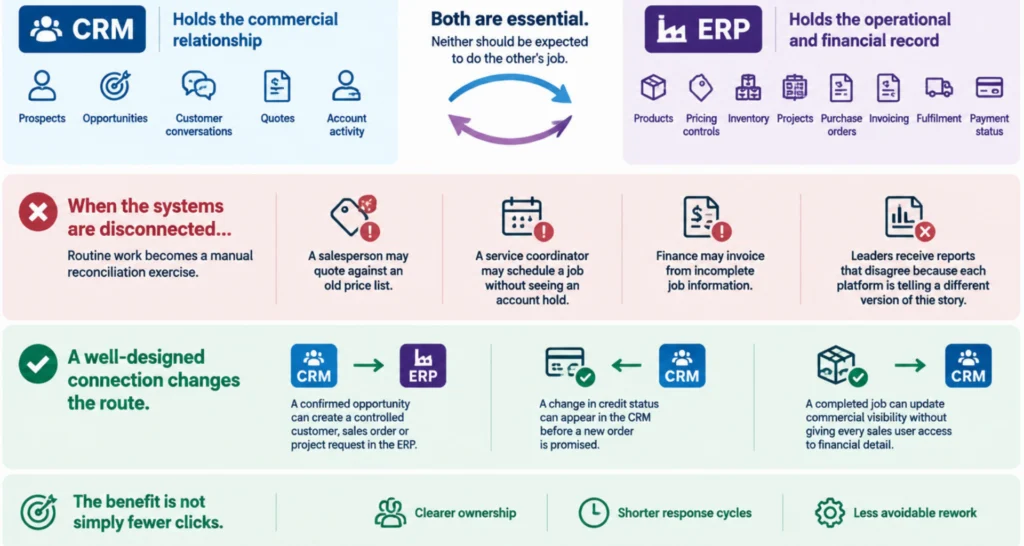
A CRM holds the commercial relationship: prospects, opportunities, customer conversations, quotes and account activity. An ERP holds the operational and financial record: products, pricing controls, inventory, projects, purchase orders, invoicing, fulfilment and payment status. Both are essential. Neither should be expected to do the other’s job.
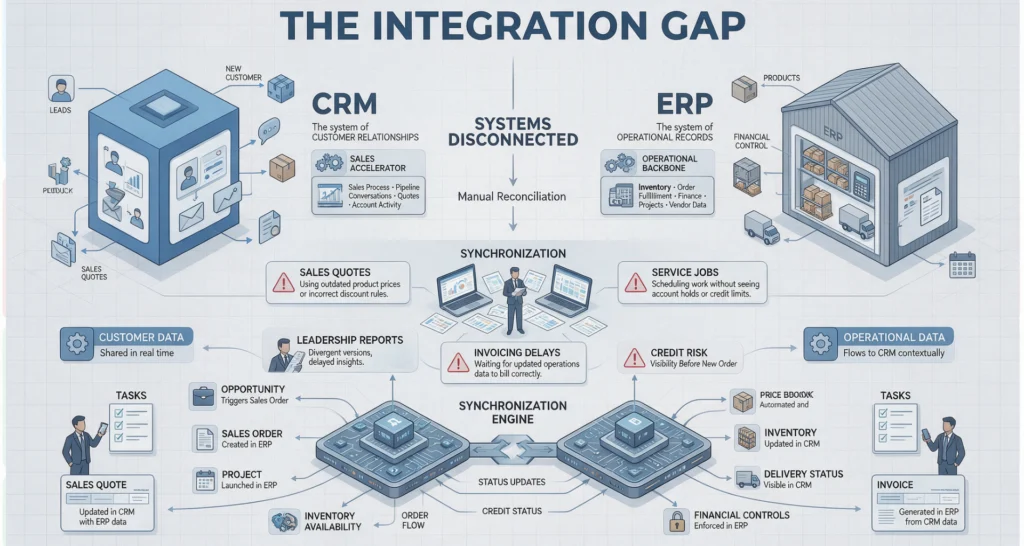
When the systems are disconnected, routine work becomes a manual reconciliation exercise. A salesperson may quote against an old price list. A service coordinator may schedule a job without seeing an account hold. Finance may invoice from incomplete job information. Leaders receive reports that disagree because each platform is telling a different version of the story.
A well-designed connection changes the route. A confirmed opportunity can create a controlled customer, sales order or project request in the ERP. A change in credit status can appear in the CRM before a new order is promised. A completed job can update commercial visibility without giving every sales user access to financial detail.
The benefit is not simply fewer clicks. It is clearer ownership, shorter response cycles and less avoidable rework.
Connect CRM and ERP systems around a workflow, not a data dump
The most common mistake is starting with a list of objects to sync: contacts, accounts, products, invoices and orders. Those objects matter, but they do not explain what should happen when information changes, who is allowed to trigger it, or what should happen when the systems disagree.
Start with a real operational flow instead. For example, a field service business might map this route:
-
1
A customer accepts a quote in the Customer Relationship Management short CRM.
-
2
The system checks that the customer record, service address and agreed scope are complete.
-
3
The Enterprise Resource Planning verifies credit status, contract terms and available materials.
-
4
A coordinator approves exceptions such as a margin below threshold or a delivery date beyond current capacity.
-
5
The approved job or order is created in the Enterprise Resource Planning short ERP.
-
6
Status updates return to the CRM so the account team can communicate accurately.
-
7
The route records the source, decision, approver and resulting identifiers.
This framing exposes the questions that matter. Does a new CRM company create a customer in the ERP automatically, or only after an accepted quote? Which system owns addresses? Can a salesperson alter a product price, or must the ERP price book prevail? What happens when an integration fails halfway through?
There is no universal answer. A professional services firm may create an ERP project at contract execution. A distributor may need stock and credit checks before an order exists. A healthcare administrator may require a human review before any record crosses a privacy boundary. The route must reflect the business model and risk profile.
LET’S BUILD WHAT’S NEXT
Make your next move
an intelligent one.
Tell us where the bottlenecks are. Let’s explore what AI can do for your business.
Establish system ownership before building anything
Every shared data element needs an authoritative source. Without it, teams can unknowingly overwrite correct information with an older or less reliable value.
In many environments, the CRM is authoritative for leads, opportunities, relationship notes and commercial pipeline stages. The ERP is authoritative for item masters, tax treatment, stock availability, invoice balances, payment terms and fulfilment status. Customer identity often needs more care. The CRM may capture a prospect first, while the ERP becomes authoritative once that prospect becomes a trading customer.
Write these rules down in plain language. Include what is allowed to travel in each direction, when it travels, and what must never be copied. Financial information, employee data, clinical notes and sensitive documents often require narrower access than a standard account record.
This is also where duplicate management belongs. A connection that automatically creates new customer records without identity matching will produce a tidy technical log and a messy commercial database. Use agreed matching rules, confidence thresholds and a review queue for uncertain matches. Human judgement is often cheaper than repairing hundreds of duplicate records later.
Design decision boundaries, not just triggers
An integration trigger is easy to describe: when an opportunity reaches Closed Won, create an order. A decision boundary is more useful: create an order only if the customer is verified, mandatory fields are complete, the agreed margin meets policy, the credit check passes and the required approver has signed off.
That boundary protects both the customer experience and the business. It stops a workflow from treating every data change as equally trustworthy.
Good orchestration separates actions into three categories. Some actions can proceed automatically, such as updating a non-sensitive status or copying a validated contact number. Some need a policy check, such as determining whether a discount exceeds a delegation limit. Others require explicit human approval, such as changing payment terms, releasing a held account or committing resources to a high-value project.
AI can assist at these points without becoming the decision-maker. An agent might read an email, extract a purchase order number, identify missing information and prepare the next action. It should not approve a credit exception or alter a contractual commitment unless the organisation has explicitly delegated that authority. Capture the supporting evidence and keep the accountable person visible.
Choose the right integration pattern
The technical pattern should follow the workflow volume, timing and level of risk.
A scheduled batch may be sufficient for overnight finance reporting or daily product updates. It is simpler to operate, but unsuitable when a customer expects a live answer about stock or job status. Event-driven integration is better for time-sensitive changes, such as a confirmed order, shipment update or account hold. It provides faster action but demands stronger error handling and monitoring.
A middleware or orchestration layer is usually preferable to a brittle point-to-point connection, particularly where multiple systems are involved. It can apply mapping rules, enforce permissions, route approvals, retry failed actions and create a traceable record. It also reduces the risk of rebuilding every connection when one platform changes.
For organisations introducing intelligent agents, controlled tool access matters. An MCP server integration can provide an agent with approved, scoped access to CRM and ERP actions rather than broad credentials and uncontrolled database access. The agent receives only the context and tools required for its assigned route. Policy checks and approval steps remain outside the model’s discretion.
Plan for failure before launch
Integrations fail. APIs time out, records are locked, field formats change, users enter incomplete data and a downstream platform may be unavailable during a critical window. Treating these as edge cases is how a minor issue becomes a queue of unbilled work or duplicate orders.
Each route needs a clear response when something goes wrong. Failed transactions should be visible to an owner, not buried in a technical log. The system should preserve enough context to retry safely without creating duplicates. Where a partial action occurs, the route should either complete the remaining steps or flag the record for controlled resolution.
Measure more than technical uptime. Track exceptions by cause, time from trigger to completion, manual touches per transaction, duplicate rates and rework avoided. These measures show whether the connection is improving operational capacity, not merely moving data faster.
Start with a route worth fixing
The first CRM-ERP integration should target a workflow that is frequent, painful and bounded enough to govern. Quote-to-order, customer onboarding, job completion-to-invoice and account hold notifications are often strong candidates because the hand-offs are visible and the outcome can be measured.
Avoid trying to synchronise the entire estate in one programme. Establish ownership, test the route with real exceptions, train the people who resolve them and review the evidence after launch. Then extend what works.
Connected systems are most valuable when they make responsible action easier. Build the route so people can move quickly with the right context, while consequential decisions remain visible, approved and owned.